
キーワード DCT が含まれる動画 : 411 件中 33 - 64 件目
種類:
- タグ
- キーワード
対象:
H264出力テスト動画(600k)

映像ビットレート - 500k 音声 - AAC-LC 96k 512×384
option
--bitrate 500 --pass 3 --stats ".\x264.stats" --qcomp 0.7 --qpstep 20 --scenecut 75 --min-keyint 1 --keyint 300 --8x8dct --partitions "p8x8,b8x8,i8x8,i4x4" --bframes 2 --weightb --direct "spatial" --subme 7 --me "umh" --merange 64 --ref 3 --mixed-refs --threads "auto" --trellis 2 --deblock -1:-1 --cqm "jvt" --output nul
モーションはサンプルきしめん MMD出力 - 1600×1200 AviUtlにて少々フィルタかけた後2passでエンコード
800k 800*600 >> sm3964781
800k 512*384 >> sm3965087
ケミとホムで亀地上

Do you have a 肉臭?
エンコード設定
シャープフィルタのみ
--bitrate 700 --pass 3 --stats ".\x264.stats" --aq-strength -1.35 --qpmin 18 --qpstep 10 --scenecut 54 --min-keyint 1 --keyint 300 --8x8dct --partitions "all" --bframes 2 --b-pyramid --bime --weightb --direct "spatial" --direct-8x8 0 --subme 7 --me "umh" --merange 16 --ref 2 --mixed-refs --threads "auto" --trellis 2 --deblock -5:-5 --cqm "jvt" --no-fast-pskip --no-dct-decimate --output nul
日曜日からの使者-The High Lows(The High Lowsより)
【PS2版ソース】 BALDR FORCE EXE デモ H.264ver

アス比間違ってたアッー!ということで修正。
--bitrate 755 --qpmin 26 --qpstep 12 --scenecut 50 --min-keyint 10 --keyint 300 --8x8dct --partitions "p8x8,b8x8,i8x8,i4x4" --bframes 3 --b-pyramid --bime --weightb --direct "auto" --b-rdo --subme 7 --me "umh" --merange 32 --ref 5 --mixed-refs --trellis 2 --cqm "flat" --no-fast-pskip --no-dct-decimate
前よりだいぶマシになった。 mylist/4610145
【RO】スリッパではよくあること

私のような貧民にも無限の可能性を与えてくださる
敬愛するスリーパー様への感謝の形としてこのような動画を撮ってみました。続編(?)sm4218728
_,,..,,,,..
/ ヽ
:' ^o^ i というわけでわれをあがめよ
.ノ :'
ノ.. ,,, ..., ヽ..
エンコード設定
--bitrate 700 --pass 3 --stats ".x264.stats" --aq-strength -1.35 --qpmin 18 --qpstep 10 --scenecut 54 --min-keyint 1 --keyint 300 --8x8dct --partitions "all" --bframes 2 --b-pyramid --bime --weightb --direct "spatial" --direct-8x8 0 --subme 7 --me "umh" --merange 16 --ref 2 --mixed-refs --threads "auto" --trellis 2 --deblock -5:-5 --cqm "jvt" --no-fast-pskip --no-dct-decimate --output nul
H264出力テスト動画(800k 800*600)

映像bitlate - 700k 音声 - AAC-LC 96k 800×600
option
--bitrate 700 --pass 3 --stats ".\x264.stats" --qcomp 0.7 --qpstep 20 --scenecut 75 --min-keyint 1 --keyint 300 --8x8dct --partitions "p8x8,b8x8,i8x8,i4x4" --bframes 2 --weightb --direct "spatial" --b-rdo --subme 7 --me "umh" --merange 64 --ref 3 --mixed-refs --threads "auto" --trellis 2 --deblock -1:-1 --cqm "jvt" --output nul
モーションはサンプルきしめん MMD出力 - 1600×1200 AviUtlにて少々フィルタかけた後2passでエンコード
800k 512*384 >> sm3965087
600k 512*384 >> sm3934245
H264出力テスト動画(800k 512*384)

映像bitlate - 700k 音声 - AAC-LC 96k 512×384
option
--bitrate 700 --pass 3 --stats ".\x264.stats" --qcomp 0.7 --qpstep 20 --scenecut 75 --min-keyint 1 --keyint 300 --8x8dct --partitions "p8x8,b8x8,i8x8,i4x4" --bframes 2 --weightb --direct "spatial" --b-rdo --subme 7 --me "umh" --merange 64 --ref 3 --mixed-refs --threads "auto" --trellis 2 --deblock -1:-1 --cqm "jvt" --output nul
モーションはサンプルきしめん MMD出力 - 1600×1200 AviUtlにて少々フィルタかけた後2passでエンコード
800k 800*600 >> sm3964781
600k 512*384 >> sm3934245
動画画質テスト

--bitrate 500 --pass 3 --stats ".\x264.stats" --aq-strength 0 --ipratio 1.6 --qpmin 1 --qpmax 70 --qpstep 32 --scenecut 54 --min-keyint 1 --keyint 300 --8x8dct --partitions "p8x8,b8x8,i4x4" --bframes 16 --b-pyramid --bime --weightb --direct "auto" --direct-8x8 0 --subme 7 --me "esa" --merange 32 --ref 16 --mixed-refs --threads "auto" --trellis 2 --deblock -6:-6 --cqm "jvt" --no-fast-pskip --no-dct-decimate --output nul @@@@@@ 649,378バイト168フレーム20fps
動画画質テスト

--bitrate 480 --pass 3 --stats ".\x264.stats" --aq-strength 0 --ipratio 1.6 --qpmin 1 --qpmax 70 --qpstep 32 --scenecut 54 --min-keyint 1 --keyint 300 --8x8dct --partitions "p8x8,b8x8,i4x4" --bframes 16 --b-pyramid --bime --weightb --direct "auto" --direct-8x8 0 --subme 7 --me "esa" --merange 32 --ref 16 --mixed-refs --threads "auto" --trellis 2 --deblock -6:-6 --cqm "jvt" --no-fast-pskip --no-dct-decimate --output nul @@@@@@@321,780バイト80フレーム20fps
yy's 動画画質テスト

--bitrate 590 --pass 3 --stats ".\x264.stats" --aq-strength 0 --ipratio 1.6 --qpmin 1 --qpmax 51 --qpstep 32 --scenecut 54 --min-keyint 1 --keyint 300 --8x8dct --partitions "p8x8,b8x8,i4x4" --bframes 16 --b-pyramid --bime --weightb --direct "auto" --direct-8x8 0 --subme 7 --me "esa" --merange 32 --ref 16 --mixed-refs --threads "auto" --trellis 2 --deblock -6:-6 --cqm "jvt" --no-fast-pskip --no-dct-decimate --output nul @@@@@@FPSを1/3に修正 -> sm4080333
ベートーヴェン:コリオラン序曲

megui 0.3.0 + x264 r928, 映像3pass 515Kbps 音声AAC 128Kbps
--keyint 300 --min-keyint 30 --ref 6 --mixed-refs --no-fast-pskip --bframes 16 --b-pyramid --b-rdo --bime --weightb --direct auto --subme 7 --trellis 2 --partitions all --8x8dct --me umh --psy-rd 1
カラヤン / ベルリン・フィルハーモニー / 1975年1月
[x264]画質テスト[その2]
![[x264]画質テスト[その2]](https://nicovideo.cdn.nimg.jp/thumbnails/4292619/4292619)
オプションをそのまま貼ってみる
--bitrate 745 --pass 3 --stats ".\x264.stats" --aq-mode 0 --aq-strength 0 --qpmin 1 --qpmax 40 --qpstep 16 --scenecut 54 --min-keyint 1 --keyint 300 --8x8dct --partitions "p8x8,b8x8,i8x8,i4x4" --bframes 2 --b-pyramid --bime --weightb --direct "auto" --b-rdo --subme 7 --me "umh" --merange 64 --ref 5 --mixed-refs --threads "auto" --trellis 2 --cqm "jvt" --no-fast-pskip --no-dct-decimate
なんかいまいち・・・
mylist/7976206
[x264]画質テスト[その3]
![[x264]画質テスト[その3]](https://nicovideo.cdn.nimg.jp/thumbnails/4293505/4293505)
拡張x264出力rev934 OreAQVer使用 10pass
--bitrate 750 --pass 3 --stats ".x264.stats" --aq-strength -0.5 --qpmin 1 --qpmax 32 --qpstep 16 --scenecut 64 --min-keyint 1 --keyint 300 --8x8dct --partitions "p8x8,b8x8,i8x8,i4x4" --bframes 2 --b-pyramid --bime --weightb --direct "auto" --b-rdo --subme 7 --me "umh" --merange 16 --ref 3 --mixed-refs --threads "auto" --trellis 2 --nr 150 --cqm "jvt" --no-fast-pskip --no-dct-decimate
mylist/7976206
[x264]画質テスト(100pass)[その4]
![[x264]画質テスト(100pass)[その4]](https://nicovideo.cdn.nimg.jp/thumbnails/4297365/4297365)
2分の動画で2時間エンコードとか・・・さすがに100passは実用的じゃないw
拡張x264出力 rev934 OreAQver使用 100pass
--bitrate 750 --pass 3 --stats ".\x264.stats" --ipratio 1.3 --pbratio 1.2 --qpmin 1 --qpmax 32 --qpstep 16 --scenecut 64 --min-keyint 1 --keyint 300 --8x8dct --partitions "p8x8,b8x8,i8x8,i4x4" --bframes 2 --b-pyramid --bime --weightb --direct "auto" --b-rdo --subme 7 --me "umh" --merange 32 --ref 3 --mixed-refs --threads "auto" --trellis 2 --nr 200 --cqm "jvt" --no-fast-pskip --no-dct-decimate
mylist/7976206
[x264]画質テスト[その5]
![[x264]画質テスト[その5]](https://nicovideo.cdn.nimg.jp/thumbnails/4307908/4307908)
みんなこれどうやってエンコしてんだ・・・
絶望的にビットレートが足りないorz
なんか効果的なオプションあるんかな(´・ω・`)
拡張x264出力 rev934 OreAQver使用 10pass
--bitrate 775 --pass 3 --stats ".\x264.stats" --aq-mode 0 --aq-strength 0 --qcomp 0.95 --qpmin 1 --qpstep 60 --scenecut 90 --min-keyint 1 --keyint 300 --8x8dct --partitions "all" --bframes 4 --bime --weightb --direct "spatial" --direct-8x8 0 --b-rdo --subme 7 --me "umh" --merange 16 --ref 3 --mixed-refs --threads "auto" --trellis 2 --deblock 2:2 --cqm "jvt" --no-fast-pskip --no-dct-decimate
mylist/7976206
[x264]画質テスト[その5(リベンジ)]
![[x264]画質テスト[その5(リベンジ)]](https://nicovideo.cdn.nimg.jp/thumbnails/4332774/4332774)
なんか前より汚くなってるかもしれないけど感覚が麻痺してわからなくなってきたorz
--bitrate 775 --pass 3 --stats ".\x264.stats" --aq-mode 0 --aq-strength 0 --qcomp 0.95 --qpmin 8 --qpmax 40 --qpstep 40 --scenecut 90 --min-keyint 1 --keyint 300 --8x8dct --partitions "all" --bframes 4 --bime --weightb --direct "spatial" --direct-8x8 0 --b-rdo --subme 7 --me "umh" --merange 16 --ref 3 --mixed-refs --threads "auto" --trellis 2 --deblock 4:1 --cqm "jvt" --no-fast-pskip --no-dct-decimate
アイドルマスター 美希 UP Here we go!! エンコテスト

要望に答えてみる 其ノ弐(sm4401624)がやたらカクカクすると思ったら720p素材提供用の設定だった。
こりゃダメだ Core2Duo 2.13GHz でカクカクするwww。
Core2Quad 2.4GHz なら大丈夫www。
450p 1.4Mbps だとカクカクしないんだよね。何故だろう?
画像(かなり適当)
512x288/59.94p 726kbps 3pass
--qpmin 4 --qpstep 10 --scenecut 70 --8x8dct --partitions "all" --bframes 16 --direct "auto" --subme 5 --me "hex" --merange 16 --ref 5 --threads "auto" --deblock 2:0 --cqm "flat"
音声
AAC-HE 64kbps
# --threads "auto" がカクカクの主原因らしい。エンコ早いのに・・
やよいのティガレックス討伐訓練

来るアイマスSPに向けてPSPのエンコテスト
512 x 288 60FPS AAC-HE32K, ノイズ除去、クリッピング、lancoz
--bitrate 780 --pass 3 --stats ".x264.stats" --qpstep 8 --scenecut 60 --min-keyint 30 --8x8dct --partitions "p8x8,b8x8,i8x8,i4x4" --bframes 2 --weightb --direct "auto" --subme 7 --me "umh" --merange 16 --ref 1 --threads 6 --trellis 2 --nr 100 --cqm "flat" --output nul
その2:http://www.nicovideo.jp/watch/sm4482979
やよいのティガレックス討伐訓練2

※スーパー動画ではありません。運だけです※
エンコ調整してたら良いタイムが出たのでうp
RecInのボリュームを下げて800x450にしてみた
PV4 SE-200PCI H.264 800x450 29.97fps AAC HE32K
ノイズ除去 シャープフィルタ クリッピング lancoz
--bitrate 780 --pass 3 --stats ".\x264.stats" --qpstep 8 --scenecut 60 --min-keyint 30 --8x8dct --partitions "p8x8,b8x8,i8x8,i4x4" --bframes 2 --weightb --direct "auto" --subme 7 --me "umh" --merange 16 --ref 1 --threads 6 --trellis 2 --nr 100 --cqm "flat" --output nul
その1:http://www.nicovideo.jp/watch/sm4479538
beatmania featuring DREAMS COME TRUE オープニングデモ(CS版)

もはや誰も知らないのではないかと言われるほどマイナー(?)な、featuring DCTのオープニングデモを撮ってみました。
SNOW DANCE(チュートリアル) ⇒ うれしい!たのしい!大好き! ⇒ 朝がまた来る(モンキーライブ解説) ⇒ 決戦は金曜日 の順でループしているようです。判定が表示されないのが少々寂しい……。ランキング画面の内容は毎回同じのようなので、2回目以降はスキップしました。
◆HARDモードプレイは ⇒ sm4556112
◆Remixコースプレイは ⇒ sm4611651
◆その他の動画は ⇒ mylist/3532510
beatmania featuring DREAMS COME TRUE HARDモードプレイ

featuring DCTより、自分が好きな3曲をHARDモードでプレイしてみました。この位の難易度が程よく楽しめていいですね。今回はスタッフロールも撮ってあります。製作スタッフの面子に注目。
DCTは曲選択画面で曲がプレビュー演奏されるのが良いですね。後のbeatmaniaシリーズにも実装されて欲しかったです。
◆オープニングデモは ⇒ sm4514344
◆Remixコースプレイは ⇒ sm4611651
◆その他の動画は ⇒ mylist/3532510
beatmania featuring DREAMS COME TRUE MONKeY LIVE Remixコースプレイ
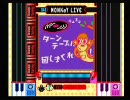
NANTE KOI SHITANDARO(KING CRAFTY MIX) ⇒ SNOW DANCE(Balearic Togs Konami Remix) ⇒ AHAHA(KING CRAB MIX) ⇒ SONG OF JOY(KING CRAB MIX)
featuring DCTより、Remixコースです。本作のEXPERTモードは曲間にMONKeY LIVEという演出があり、ゲージが減少していればここで若干増やすことができます。しかしこれ、楽しいと思う人いるのだろうか……?
DCTはアーケードでほとんどプレイしたことがなく、印象が薄いので動画作成はこれで終了です。次はClubMIXやります。
◆オープニングデモは ⇒ sm4514344
◆HARDモードプレイは ⇒ sm4556112
◆その他の動画は ⇒ mylist/3532510
エンコテスト

--bitrate 545 --ipratio 1.6 --pbratio 1.6 --qcomp 0.7 --qpmin 12 --qpstep 16 --scenecut 54 --min-keyint 1 --keyint 300 --8x8dct --partitions "all" --bframes 7 --weightb --b-adapt 2 --ref 5 --mixed-refs --direct "auto" --me "umh" --subme 8 --merange 48 --no-cabac --cqm "flat" --no-fast-pskip --no-dct-decimate -no-cabacの実験。SSIMは0.982前後だからそこそこ見られるはず…。 ソース自体があんまり綺麗じゃないから微妙だが。
tes

--bitrate 272 --pass 3 --stats ".\x264.stats" --aq-strength 0.5 --qpstep 20 --scenecut 50 --min-keyint 30 --keyint 300 --8x8dct --partitions "p8x8,b8x8,i8x8,i4x4" --bframes 3 --direct "auto" --subme 5 --me "umh" --merange 16 --ref 3 --threads "auto" --deblock -2:-2 --cqm "jvt"
エンコードとAviSynthフィルターのテスト

■白騎士物語トレイラー ■H264 [email protected], 79.446 secs, 581 kbps, 512x288 @ 29.982630 fps MPEG-4 AAC LC, 79.523 secs, 63 kbps, 44100 Hz ■Aviutl99fでAviSynthフィルター数個通し 黒地に赤がグチャグチャに潰れとる どう解消すればいいんだろこれ 4:4:4補間でもダメだし、うーん --bitrate 580 --pass 3 --stats ".x264.stats" --aq-mode 0 --psy-rd 1.1:0.7 --qpmin 18 --qpstep 10 --scenecut 65 --min-keyint 1 --keyint 300 --8x8dct --partitions "p8x8,b8x8,i8x8,i4x4" --bframes 3 --b-adapt 2 --ref 3 --mixed-refs --direct "auto" --direct-8x8 -1 --me "esa" --subme 9 --merange 64 --threads "auto" --trellis 2 --deblock -2:-2 --cqm "jvt" --no-fast-pskip --no-dct-decimate --output nul
x264テスト動画” F-ZERO GX ”1/2

x264てすと。captured by Intensity Pro__Source : vcodec= M-Jpeg - 720*486 - 29.97fps - 13.5Mbps + acodec= 16bit_PCM 1.5Mbps_____MPEG Streamclip & x264encoder + l5 デインターレース__MScp= LimitDataRate:850 / Quality:100 / Multipass / B-Frames / FrameBlending / BetterDownscaling / 512*384 / LowerField First / Cropping:20-20-20-20_Source___x264enc="flag tab" FLAG_LOOP_FILTER/ WPRED / MIXED_REFS / 8X8DCT / cmp /partp4x4 / no_dct_decimate / __"values"me_method=ESA / CABAC / directpred=3 / trellis=2 / threads=4 / Faster FirstPass=Turbo / AQmode=1 / strategy=2 / __refs=10 / subme=9 / me_range=32 / max_b_frames=8 / sc_threshold=90 / noise reduction=1000 / keyInt min=1___"extra options"__Container level color adjustment=6-1-6_Native fps=59.940_use 3rd pass___________________その他- myvideo/148620
x264テスト動画” F-ZERO GX ”2/2

x264てすと2。captured by Intensity Pro__Source : vcodec= "M-Jpeg - 720*486 - 29.97fps - 13.5Mbps" + "acodec= 16bit_PCM 1.5Mbps"_____MPEG Streamclip & x264encoder + l5 デインターレース__MScp= LimitDataRate:690 / Quality:100 / Multipass / B-Frames / FrameBlending / BetterDownscaling / 512*384 / LowerField First / Cropping:20-20-20-20_Source___x264enc="flag tab" FLAG_LOOP_FILTER/ WPRED / MIXED_REFS / 8X8DCT / cmp /partp4x4 / no_dct_decimate / __"values"me_method=ESA / CABAC / directpred=3 / trellis=2 / threads=4 / Faster FirstPass=Turbo / AQmode=1 / strategy=2 / __refs=10 / subme=9 / me_range=32 / max_b_frames=8 / sc_threshold=90 / noise reduction=1000 / keyInt min=1___"extra options"__Container level color adjustment=6-1-6_Native fps=59.940_use 3rd pass___________________その他- myvideo/148620
upテスト(1Mbps)|千早 my song B ライブフォーヴィーナス

高画質祭りに便乗してみたがなんか微妙。
コマンドライン:--bitrate 880 --pass 3 --stats ".\x264.stats" --aq-mode 0 --psy-rd 0:0 --qcomp 0.7 --qpstep 20 --scenecut 75 --min-keyint 1 --keyint 300 --8x8dct --partitions "p8x8,b8x8,i8x8,i4x4" --bframes 2 --b-pyramid --weightb --b-adapt 2 --ref 8 --mixed-refs --direct "auto" --me "umh" --subme 9 --merange 64 --trellis 2 --deblock -2:-2 --cqm "jvt" --output nul
解像度:800x450 フレームレート:60fps
音声:NeroAACエンコーダ AAC-LC 128kbps 2pass
キャプボは変わらずPV4。
以前にうpしたもの→sm5114705 sm5116958
アイマス以外も含めた自作動画のマイリスト mylist/1699816
【MAD】[涼宮ハルヒの憂鬱] squall 【1Mbps】
![【MAD】[涼宮ハルヒの憂鬱] squall 【1Mbps】](https://nicovideo.cdn.nimg.jp/thumbnails/5544774/5544774)
動画製作者:ルリシスさん
エンコ殺しの動画でどこまでいけるかテストしてみました第二弾
800kbps同動画→sm2655497
512x288 24Bit AVC/H.264 [email protected] 23.96fps 2171f 958.30kb/s
AAC 44.10kHz 2.0ch(2/0 L+R) HE+SBR 47.05kb/s
フィルタ→[色調補正、シャープフィルタ、ノイズ除去フィルタ、ノイズ除去(時間軸)フィルタ]
[prefillter for nonlinear sharpen、nonlinear sharpen、WarpSharp、Wavelet_NR Type-G]
設定→[--bitrate 952 --pass 3 --stats ".x264.stats" --qpmin 1 --qpstep 16 --scenecut 75 --min-keyint 1 --8x8dct --partitions "p8x8,b8x8,i8x8,i4x4" --bframes 16 --b-pyramid --bime --weightb --b-adapt 2 --direct "auto" --b-rdo --subme 7 --me "esa" --merange 32 --ref 8 --mixed-refs --trellis 2 --cqm "flat" --no-fast-pskip --no-dct-decimate]
その他→http://www.nicovideo.jp/mylist/5525261
BALDR FORCE Standard Edition OP (800x600)

プレミア画質でテスト。800x600解像度でエンコード。拡大非推奨
■動画情報
映像BR: 1000kbps 2pass / 音声BR: AAC-HE 40kbps 2pass
■使用したx264オプション
--bitrate 1000 --pass 3 --stats ".\x264.stats" --aq-mode 0 --qpstep 16 --scenecut 54 --min-keyint 1 --keyint 300 --8x8dct --partitions "p8x8,b8x8,i8x8,i4x4" --bframes 5 --b-pyramid --weightb --b-adapt 2 --ref 8 --mixed-refs --direct "auto" --me "umh" --subme 9 --merange 64 --threads "auto" --trellis 2 --deblock -2:-2 --cqm "flat" --output nul
家庭用beatmania5鍵盤システムBGM集

家庭用beatmaniaシリーズのシステムBGMを集めてみました(feat.DCTはソフトを作成当時所有していなかったため、この動画には収録していません。ご了承下さい)。なんだか慌ただしい感じになってスミマセン。個人的には4thと5thのTRAININGの曲が好きです。 ▽OP(1/2):sm6080400 OP(2/2):sm6080562 ED(1/2):sm6083427 ED(2/2):sm6083560 AC版5鍵盤OPED:sm2325081 ▼5鍵盤プレイ動画:mylist/3933414 beatmania史料集:mylist/19901305 1曲XX秒:mylist/19901205 音ゲー関連動画:mylist/11387491
RO Loki 090308 石投げ動画 その1

ベースでヒール受けるためにドル脱いだらそのまま着忘れるとかもうね。これ以上に退屈な仕上がりにしかならなかったのでその2は無しで。 --bitrate 590 --pass 3 --stats ".x264.stats" --aq-mode 0 --psy-rd 0.8:0 --qpmin 1 --qpstep 16 --scenecut 54 --keyint 125 --8x8dct --partitions "p8x8,b8x8,i8x8,i4x4" --bframes 16 --weightb --b-adapt 2 --ref 3 --mixed-refs --direct "auto" --me "umh" --subme 9 --merange 64 --threads 6 --trellis 2 --no-deblock --cqm "flat" --no-dct-decimate
CABACを切るとエコノミー画質が崩壊する例

どうもCABACを切るとエコ画質が崩壊することがあるようなので、実例として一応上げておきます。この動画はCABACを切っている以外はsm7295561と同じエンコ設定ですが、明らかに崩壊している箇所があります。
また、同じくCABACオフでエンコしたカトケン動画(sm7088500)もエコ画質が崩壊しています。
※エコノミー版を見るには、URL末尾に ?eco=1 を追加
ただCABACオフでも崩壊してない動画もあるので、複合的な原因かも(60FPSなのが関係してるとか?)
エンコーダ: x264gui r1163
オプション: --bitrate 900 --pass 3 --qpmin 1 --qpstep 16 --keyint 300 --8x8dct --partitions "p8x8,b8x8,i8x8,i4x4" --bframes 4 --weightb --b-adapt 2 --ref 4 --mixed-refs --direct "auto" --me "tesa" --subme 9 --merange 32 --threads "auto" --no-cabac --deblock -1:-1 --cqm "flat" --no-fast-pskip --no-dct-decimate