
キーワード DEPTH が含まれる動画 : 1600 件中 65 - 96 件目
種類:
- タグ
- キーワード
対象:
【縦576前後色空間テスト】1024x578 BT.601 colormatrixなし

■環境
AviUtl 0.99j
拡張x264guiEx 1.13
x264 r2106 8bit-depth
■素材画像 im1554681
■avsファイル
ImageSource("ColorBarHD.png", end=99, fps=10)
LanczosResize(1024,578)
■AviUtlの「色空間の設定」の「出力」の設定
→BT.601に設定
■拡張x264guiExの設定
--crf 23 --level 3.1
■テスト動画一覧→ mylist/29603171
【縦576前後色空間テスト】1024x574 BT.709 bt709

■環境
AviUtl 0.99j
拡張x264guiEx 1.13
x264 r2106 8bit-depth
■素材画像 im1554681
■avsファイル
ImageSource("ColorBarHD.png", end=99, fps=10)
LanczosResize(1024,574)
■AviUtlの「色空間の設定」の「出力」の設定
→BT.709に設定
■拡張x264guiExの設定
--crf 23 --colormatrix bt709 --level 3.1
■テスト動画一覧→ mylist/29603171
【縦576前後色空間テスト】1024x574 BT.709 colormatrixなし

■環境
AviUtl 0.99j
拡張x264guiEx 1.13
x264 r2106 8bit-depth
■素材画像 im1554681
■avsファイル
ImageSource("ColorBarHD.png", end=99, fps=10)
LanczosResize(1024,574)
■AviUtlの「色空間の設定」の「出力」の設定
→BT.709に設定
■拡張x264guiExの設定
--crf 23 --level 3.1
■テスト動画一覧→ mylist/29603171
【縦576前後色空間テスト】1024x576 BT.709 bt709

■環境
AviUtl 0.99j
拡張x264guiEx 1.13
x264 r2106 8bit-depth
■素材画像 im1554681
■avsファイル
ImageSource("ColorBarHD.png", end=99, fps=10)
LanczosResize(1024,576)
■AviUtlの「色空間の設定」の「出力」の設定
→BT.709に設定
■拡張x264guiExの設定
--crf 23 --colormatrix bt709 --level 3.1
■テスト動画一覧→ mylist/29603171
【縦576前後色空間テスト】1024x576 BT.709 colormatrixなし

■環境
AviUtl 0.99j
拡張x264guiEx 1.13
x264 r2106 8bit-depth
■素材画像 im1554681
■avsファイル
ImageSource("ColorBarHD.png", end=99, fps=10)
LanczosResize(1024,576)
■AviUtlの「色空間の設定」の「出力」の設定
→BT.709に設定
■拡張x264guiExの設定
--crf 23 --level 3.1
■テスト動画一覧→ mylist/29603171
【縦576前後色空間テスト】1024x578 BT.709 bt709

■環境
AviUtl 0.99j
拡張x264guiEx 1.13
x264 r2106 8bit-depth
■素材画像 im1554681
■avsファイル
ImageSource("ColorBarHD.png", end=99, fps=10)
LanczosResize(1024,578)
■AviUtlの「色空間の設定」の「出力」の設定
→BT.709に設定
■拡張x264guiExの設定
--crf 23 --colormatrix bt709 --level 3.1
■テスト動画一覧→ mylist/29603171
【縦576前後色空間テスト】1024x578 BT.709 colormatrixなし

■環境
AviUtl 0.99j
拡張x264guiEx 1.13
x264 r2106 8bit-depth
■素材画像 im1554681
■avsファイル
ImageSource("ColorBarHD.png", end=99, fps=10)
LanczosResize(1024,578)
■AviUtlの「色空間の設定」の「出力」の設定
→BT.709に設定
■拡張x264guiExの設定
--crf 23 --level 3.1
■テスト動画一覧→ mylist/29603171
【縦720前後での色空間テスト】1280x718 BT.601 smpte170m

■環境
AviUtl 0.99j
拡張x264guiEx 1.21
x264 r2120 8bit-depth
■素材画像 im1554681
■avsファイル
ImageSource("ColorBarHD.png", end=99, fps=10)
LanczosResize(1280,718)
■AviUtlの「色空間の設定」の「出力」の設定
→BT.601に設定
■拡張x264guiExの設定
--crf 23 --colormatrix smpte170m
■テスト動画一覧→ mylist/29603906
【縦720前後での色空間テスト】1280x718 BT.601 colormatrixなし

■環境
AviUtl 0.99j
拡張x264guiEx 1.21
x264 r2120 8bit-depth
■素材画像 im1554681
■avsファイル
ImageSource("ColorBarHD.png", end=99, fps=10)
LanczosResize(1280,718)
■AviUtlの「色空間の設定」の「出力」の設定
→BT.601に設定
■拡張x264guiExの設定
--crf 23
■テスト動画一覧→ mylist/29603906
【縦720前後での色空間テスト】1280x720 BT.601 smpte170m

■環境
AviUtl 0.99j
拡張x264guiEx 1.21
x264 r2120 8bit-depth
■素材画像 im1554681
■avsファイル
ImageSource("ColorBarHD.png", end=99, fps=10)
LanczosResize(1280,720)
■AviUtlの「色空間の設定」の「出力」の設定
→BT.601に設定
■拡張x264guiExの設定
--crf 23 --colormatrix smpte170m
■テスト動画一覧→ mylist/29603906
【縦720前後での色空間テスト】1280x720 BT.601 colormatrixなし
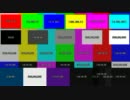
■環境
AviUtl 0.99j
拡張x264guiEx 1.21
x264 r2120 8bit-depth
■素材画像 im1554681
■avsファイル
ImageSource("ColorBarHD.png", end=99, fps=10)
LanczosResize(1280,720)
■AviUtlの「色空間の設定」の「出力」の設定
→BT.601に設定
■拡張x264guiExの設定
--crf 23
■テスト動画一覧→ mylist/29603906
【縦720前後での色空間テスト】1280x722 BT.601 smpte170m

■環境
AviUtl 0.99j
拡張x264guiEx 1.21
x264 r2120 8bit-depth
■素材画像 im1554681
■avsファイル
ImageSource("ColorBarHD.png", end=99, fps=10)
LanczosResize(1280,722)
■AviUtlの「色空間の設定」の「出力」の設定
→BT.601に設定
■拡張x264guiExの設定
--crf 23 --colormatrix smpte170m
■テスト動画一覧→ mylist/29603906
【縦720前後での色空間テスト】1280x722 BT.601 colormatrixなし

■環境
AviUtl 0.99j
拡張x264guiEx 1.21
x264 r2120 8bit-depth
■素材画像 im1554681
■avsファイル
ImageSource("ColorBarHD.png", end=99, fps=10)
LanczosResize(1280,722)
■AviUtlの「色空間の設定」の「出力」の設定
→BT.601に設定
■拡張x264guiExの設定
--crf 23
■テスト動画一覧→ mylist/29603906
【縦720前後での色空間テスト】1280x718 BT.709 bt709

■環境
AviUtl 0.99j
拡張x264guiEx 1.21
x264 r2120 8bit-depth
■素材画像 im1554681
■avsファイル
ImageSource("ColorBarHD.png", end=99, fps=10)
LanczosResize(1280,718)
■AviUtlの「色空間の設定」の「出力」の設定
→BT.709に設定
■拡張x264guiExの設定
--crf 23 --colormatrix bt709
■テスト動画一覧→ mylist/29603906
【縦720前後での色空間テスト】1280x718 BT.709 colormatrixなし

■環境
AviUtl 0.99j
拡張x264guiEx 1.21
x264 r2120 8bit-depth
■素材画像 im1554681
■avsファイル
ImageSource("ColorBarHD.png", end=99, fps=10)
LanczosResize(1280,718)
■AviUtlの「色空間の設定」の「出力」の設定
→BT.709に設定
■拡張x264guiExの設定
--crf 23
■テスト動画一覧→ mylist/29603906
【縦720前後での色空間テスト】1280x720 BT.709 bt709

■環境
AviUtl 0.99j
拡張x264guiEx 1.21
x264 r2120 8bit-depth
■素材画像 im1554681
■avsファイル
ImageSource("ColorBarHD.png", end=99, fps=10)
LanczosResize(1280,720)
■AviUtlの「色空間の設定」の「出力」の設定
→BT.709に設定
■拡張x264guiExの設定
--crf 23 --colormatrix bt709
■テスト動画一覧→ mylist/29603906
【縦720前後での色空間テスト】1280x720 BT.709 colormatrixなし

■環境
AviUtl 0.99j
拡張x264guiEx 1.21
x264 r2120 8bit-depth
■素材画像 im1554681
■avsファイル
ImageSource("ColorBarHD.png", end=99, fps=10)
LanczosResize(1280,720)
■AviUtlの「色空間の設定」の「出力」の設定
→BT.709に設定
■拡張x264guiExの設定
--crf 23
■テスト動画一覧→ mylist/29603906
【縦720前後での色空間テスト】1280x722 BT.709 bt709

■環境
AviUtl 0.99j
拡張x264guiEx 1.21
x264 r2120 8bit-depth
■素材画像 im1554681
■avsファイル
ImageSource("ColorBarHD.png", end=99, fps=10)
LanczosResize(1280,722)
■AviUtlの「色空間の設定」の「出力」の設定
→BT.709に設定
■拡張x264guiExの設定
--crf 23 --colormatrix bt709
■テスト動画一覧→ mylist/29603906
【縦720前後での色空間テスト】1280x722 BT.709 colormatrixなし

■環境
AviUtl 0.99j
拡張x264guiEx 1.21
x264 r2120 8bit-depth
■素材画像 im1554681
■avsファイル
ImageSource("ColorBarHD.png", end=99, fps=10)
LanczosResize(1280,722)
■AviUtlの「色空間の設定」の「出力」の設定
→BT.709に設定
■拡張x264guiExの設定
--crf 23
■テスト動画一覧→ mylist/29603906
10bit-depthでの色テスト【640x360、BT.601】

FlashPlayerの10bit-depth再生問題。(~11.8.800.94)
1.ハードウェアアクセラレーション無効
FlashPlayerの問題ではなく10bitの再生支援機能自体が無い。
2.右にマゼンタ色の縦線
10.1~11.1。9.0、10.0、11.2~は出ない。
3.色の誤差が大きい
10.1~。11.4~は問題4のため不明。
9.0や10.0では(16,180,16)→(16,179,15)と誤差は1程度。
10.1~は、(16,180,16)→(13,179,11)と誤差が5に拡大。
4.全体的に緑色になる
11.4~。
■x264.exe
x264 r2146 32bit 10bit-depth(JEEB
■avs
video=ImageSource("im1554681.png", end=99, fps=10)
audio=WAVSource("test.wav")
AudioDub(video,audio)
LanczosResize(640,360)
■x264の設定
x264_r2146-10bit.exe --crf 23 --colormatrix smpte170m --abitrate 64 test.mp4 test.avs

Cyberpunk Animated Backgrounds.新納隆
We offer high-quality, dynamic animated backgrounds with a cyberpunk theme, perfect for digital media, presentations, and creative projects. These backgrounds feature vibrant neon lights, futuristic cityscapes, and high-tech environments that capture the essence of a dystopian, sci-fi world. Whether you're creating a video, game, or visual project, our cyberpunk-themed animated backgrounds add atmosphere and depth to any scene.
【初期ディレイ】bframes=0、b-pyramid=none の場合 遅延なし

Bフレームによる初期ディレイ(遅延)がわかりやすいように1fps、10フレームで。
通常はedtsで調整されるが、FlashPlayerはedtsを解釈しないため遅延が起きる。
■投稿時のFlashPlayerのバージョン 11.0.1.152
■エンコード環境
AviUtl 0.99j
拡張x264出力(GUI)Ex 1.13
x264.exe r2106 32bit 8bit-depth (x264.nl)
MP4Box.exe 0.4.6 r3544 (POP氏のビルド)
neroAacEnc.exe 1.5.4.0
■エンコードオプション (bframes=0、b-pyramid=none としている。)
--crf 23 --bframes 0 --b-pyramid none --colormatrix smpte170m --level 3.1
bframes=0なので、映像の遅延は発生しません。
音声3と4の時にずれるのはFlashPlayerの問題ですかね。
■テスト動画一覧→ mylist/28386130
【初期ディレイ】bframes=3、b-pyramid=none の場合 1フレーム遅延

Bフレームによる初期ディレイ(遅延)がわかりやすいように1fps、10フレームで。
通常はedtsで調整されるが、FlashPlayerはedtsを解釈しないため遅延が起きる。
■投稿時のFlashPlayerのバージョン 11.0.1.152
■エンコード環境
AviUtl 0.99j
拡張x264出力(GUI)Ex 1.13
x264.exe r2106 32bit 8bit-depth (x264.nl)
MP4Box.exe 0.4.6 r3544 (POP氏のビルド)
neroAacEnc.exe 1.5.4.0
■エンコードオプション (bframes=3(デフォルト)、b-pyramid=none としている。)
--crf 23 --b-pyramid none --colormatrix smpte170m --level 3.1
bframes>0なので1フレーム分の映像遅延が発生しています。
■テスト動画一覧→ mylist/28386130
【初期ディレイ】bframes=3、b-pyramid=normal の場合 2フレーム遅延

Bフレームによる初期ディレイ(遅延)がわかりやすいように1fps、10フレームで。
通常はedtsで調整されるが、FlashPlayerはedtsを解釈しないため遅延が起きる。
■投稿時のFlashPlayerのバージョン 11.0.1.152
■エンコード環境
AviUtl 0.99j
拡張x264出力(GUI)Ex 1.13
x264.exe r2106 32bit 8bit-depth (x264.nl)
MP4Box.exe 0.4.6 r3544 (POP氏のビルド)
neroAacEnc.exe 1.5.4.0
■エンコードオプション (bframes=3(デフォルト)、b-pyramid=normal(デフォルト) としている。)
--crf 23 --colormatrix smpte170m --level 3.1
bframes>0 かつ b-pramid=normal なので、合計2フレーム分の映像遅延が発生しています。
■テスト動画一覧→ mylist/28386130
Alliance Materials
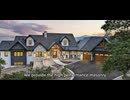
Alliance Materials established in 1995, has become a prominent industry leader not only in the Dallas/Fort Worth Metroplex but throughout the nation as well. We offer a wide range of materials, including natural stone in full bed-depth and thin veneer, architectural cut stone, custom steel, hardscape supplies, masonry tools, mortar mix, and more, catering to distributors, professionals, and DIY enthusiasts. We pride ourselves on top-notch service and competitive pricing from our knowledgeable sales team and dedicated delivery fleet.
We prioritize building strong relationships with our customers and employees, ensuring safety, speed, reliability, and integrity in all interactions. Our goal is to exceed customer expectations by providing quality materials and personalized service.
https://alliancematerials.com/
Healthy Home Inspections
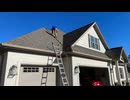
Healthy Home Inspections is a thorough home inspection service. Offering specialists with in-depth knowledge of protocol and extreme attention to detail. Services range from general home inspections to commercial inspections and more.
Healthy Home Inspections
413 NE Van Loon Lane, Unit 111, Cape Coral, FL 33904
(239) 220-5107
https://www.healthyhomeinspectionsfl.com/
![メカクシティアクターズ CM [Full HD 1080p]](https://nicovideo.cdn.nimg.jp/thumbnails/23525471/23525471)
Circles eumulating a camera lens with depth of field overlay

Circles eumulating a camera lens with depth of field overlay
Gulf Stream Boat Club
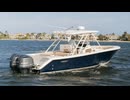
Gulfstream Boat Club is the premium, family-friendly and affordable alternative to boat ownership. Our flexible membership packages are built to suit any lifestyle. Every member has the ability to reserve boats at any of our locations any day of the week, with no blackout periods or fine print. Our premium fleet is kept in peak performance, and equipped with fantastic bluetooth sound systems, touchscreen GPS and depth finders, comfortable seating, and so much more.
Gulf Stream Boat Club
240-B Madonna Blvd, St. Petersburg, FL 33715
(888) 702-2256
https://www.gulfstreamboatclub.com/
【MMD·アークナイツ 】ベノム 【ミヅキ】*モーション一般配布终了
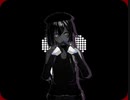
Model\(一般未配布)
Tda/WYKP/知了蝉/未来/歆眠/嫣烛
Motion&Camera\
Sano_
MME\
下っ腹P - T_ToonShader
角砂糖 - Simplecoloreditor
ましまし - msUnsharp
P.I.P / ミーフォ茜 - PostrimLightToon
P.I.P / Beamman - PostRimLightoon_Depth
ミーフォ茜 - PostrimLight2d
ikeno - ikHatching
振付\
ピヱロ
https://twitter.com/Piero_manuke/status/1366418955544322049…
Music\
本家:ベノム - かいりきベア
https://youtu.be/oRJBwaZ59fQ
ベノム / かいりきベア(Cover)ver.Sou
https://youtu.be/4XJjqLi6SjQ
モーション配布詳しくは見てください:https://privatter.net/p/7830322
508 Loop Detected

508 (Loop Detected) ステータスコードは、サーバが“Depth: infinity”を持つリクエストを処理している時に無限ループに遭遇したので、処理を終了したことを示す。 このステータスコードは、その操作全体が失敗したことを示す。mylist/36414905