
キーワード Linux が含まれる動画 : 2088 件中 1921 - 1952 件目
種類:
- タグ
- キーワード
対象:
「はじいて!しまぱんちゃん」自作ゲーム宣伝

DLsite https://www.dlsite.com/home/work/=/product_id/RJ331281.html
人気の守銭奴Vチューバー「しまぱん」の色んな姿を楽しめるピンボール!
フリッパーで球をはじき飛ばしてブロックに当てると、イラストが現れるよ。
連続で同じ色のブロックを狙って、高得点を獲得しよう。
動作環境 Windows/Linux(実験的)
CKS試験,CKS試験問題集,CKS認定試験,CKS日本語試験|gowukaku

https://www.gowukaku.com/cks-mondaishu.htmlご参考ください。
CKS問題集を使って、本を読まないで、中の問題に答えます。一回目なので、あまり詳しくないです。本をめくる必要があります。似たような経験をしたことがある人なら、「全く思い出せないので、本をめくりに行きました。記憶効果が意外にいいです」ということが分かります。
知識ポイントがある本の位置は、記憶にとって大きな助けになります。CKS問題集の中で本当の試験のテーマによって、提示された答えのあるページは記憶を絶えず強化していくほうがいいです。
さらに、各問題の後に、答えの手がかりと自分の習熟度を書き留めることもできます。 この「質問-回答-レビュー」プロセスは、習熟するまで実行できます。
要するに、このプロセスの本質は、入力中に記憶して適用する前のプロセスを放棄することですが、「出力のプロセスで学習、記憶、適用する」ことによって直接、1つのステップが実行され、効率が高くなります。
CKS問題集を使って、自分の学習効果を評価します。試験の思考で勉強しています。学習の思考で勉強しています。
GOWUKAKUに注目していただき、誠にありがとうございます。CKS試験で良い成績を収めて、The Linux Foundation Kubernetes Security Specialist証書を順調に獲得するごとができます。
Frums / Credits on actual Linux TTY
※楽曲部分にノイズを入れています
original:
sm27216934
originalのoriginal:
https://www.youtube.com/watch?v=TyB-kAXHO90&t=693s
Blog post:
https://sititou70.github.io/Credits%EF%BC%88Frums%EF%BC%89%E3%82%92%E3%83%9E%E3%82%B8%E3%81%AE%E3%82%BF%E3%83%BC%E3%83%9F%E3%83%8A%E3%83%AB%E3%81%A7/
repository:
https://github.com/sititou70/frums-credits-cli-nosound
【らせつ封魔伝】体験版

テク諏訪: https://www.technicalsuwako.jp/video/other
LBRY: https://lbry.tv/@TechnicalSuwako:d
ニコニコ動画: https://www.nicovideo.jp/user/14848316
ビットチュート: https://www.bitchute.com/channel/technicalsuwako/
マストドン: https://pawoo.net/@TechnicalSuwako
ディスコード: テクニカル諏訪子#3116
ユーチューブ: https://www.youtube.com/user/UltimatePisman
ダウンロード: https://www.dlsite.com/home/work/=/product_id/RJ293864.html
SCA SUSE Linux Enterprise Server 15 sca_sles15 Exam Questions

If you are going to take SUSE Certified Administrator in SUSE Linux Enterprise Server 15 sca_sles15 exam,we're here to provide high quality sca_sles15 Exam Dumps that will help you in the preparation of sca_sles15 exam which eventually will take you to the position of clearing this SUSE sca_sles15 exam.All you have to do is to make sure that you go through our sca_sles15 Exam Dumps at least one time to mark your success.It helps you practice in the sca_sles15 dumps so that you can have more confidence to pass your sca_sles15 exam before the actual test.
https://www.passcert.com/sca_sles15.html
新作音ゲーのPVを公開!(noapusa Extreme Lv.13)【EgülriApl】
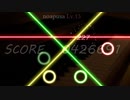
Dynamixやらがちらっと見えますが気にしてはいけない。
ところで投稿日は、、、、
使用楽曲
noapusa 魔王魂様
使用画像
要するにただの凡人様(nc104823)
使用SE
chi様(nc198563)
Y8MD様(nc200775)
OtoLogic様
使用フォント
MV Boli
Linux Libertine G
漆黒フォント
使用編集ツール
AviUtl
Gimp
Kali LinuxとVMware Workstation Playerをインストールして使用する
Kali LinuxとVMware Workstation Playerをインストールして使用する
Blog
https://akasatanahama.com/
Twitter
https://twitter.com/fullNam35087976/
Github
https://github.com/shaieaokamodkijiadjfoa/
Installing and using Kali Linux and VMware Workstation Player

Installing and using Kali Linux and VMware Workstation Player
Blog
https://akasatanahama.com/
Twitter
https://twitter.com/fullNam35087976/
Github
https://github.com/shaieaokamodkijiadjfoa/
2021申し込みしていたLPIC 201-450を受験してきました|killtest
https://www.killtest.jp/LPIC-2/201-450.aspご参考ください。
この試験は、LPIレベル2認定の必須試験です。 Linuxのすべてのディストリビューションにわたって共通する、Linux技術者にとって必要な高度な技能をカバーしています。
試験時間
90分
問題数
60問
合格点
500点(200-800点)
受験の申し込みは、Pearson VUE から
201試験:LPI Level2 Exam 201 で評価されるスキル:
キャパシティプランニング
Linuxカーネル
システム起動
ファイルシステムとデバイス
高度なストレージデバイスの管理
ネットワーク設定
システムメンテナンス
wslにalpine linuxをimportする方法を紹介します
軽量linuxのalpine linuxをwslにimportする方法を紹介します。
alpine linux
https://www.alpinelinux.org/
DaVinci Resolve を導入したので、何か作ってみた
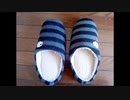
DaVinci Resolve で動画編集する実験。
DaVinci Resolve らしい事は何一つしてませんが。
機能が多すぎて何をどうやって良いのか全然わからない。初心者殺しです。
逆引き辞典みたいなのが欲しい。
まだ Public Betaってのもあるけど、色々問題が…。
バージョンは、17.0B BUILD 9
OSは Linux MINT 20
・アップデートの確認がエラーになる。
定期的に公式サイトチェックして手動でダウンロード&インストールすれば良いかな?
・漢字の入力が出来ない。
良く有ることなので気にしない。コピペで入力出来るし。
fcitx用のプラグインとかがあったりする?
・出力のフォーマットにMP4がない。
QuickTime + MPEG4 で良いか。
codec的な何かの別途インストールが必要?
・一覧に出てこないフォントがある。
解決: /usr/share/fonts に置く。~/.fonts はダメ
ところで、
このスリッパ、体を付けたら塊魂に居てもおかしくなさそうな…。
【Doki Doki Literature Club!】ラズパイ DE ドキドキ文芸部【Raspberry Pi】

この動画をご覧の方は既にドキドキ文芸部をプレイしていると思いますが、
皆様はどの環境でお遊びになられましたか?Windows?Mac?それとも?
steamから遊ばれている方は、WindowsかMacOSの方が大半ではないでしょうか。
ですが、実は公式サイトにはWindowsやMacOSのほかにLinux系でも遊べることが示されています。
そこで今回はRaspberry PiでDDLCを起動させました。
詳しい解説は年明けにでも。
Raspberry Pi財団公式 : https://www.raspberrypi.org/
ドキドキ文芸部公式 : https://ddlc.moe/
EX294 Study Guide - (RHCE) exam for Red Hat Enterprise Linux 8
EX294 Red Hat Certified Engineer (RHCE) exam for Red Hat Enterprise Linux 8 is a new released exam replacement of EX-300 Red Hat Enterprise Linux 7. To help you pass this RHCE8 EX294 exam, Passcert provides the latest (RHCE) exam for Red Hat Enterprise Linux 8 EX294 Dumps to help you prepare for your test well,it can help you gain your certification confidently. Using Passcert complete (RHCE) exam for Red Hat Enterprise Linux 8 EX294 Dumps will pass the exam easily and save much energy and time for you! We guarantee your success for RHCE EX294 exam in the first attempt.
https://www.passcert.com/EX294.html
【会計ソフトfreee】番外編【WSLを使用】 : Firebaseとfreeeのアプリを連携させる

音楽、Music: クロード・アシル・ドビュッシー《Claude Achille Debussy》
夏の風の神、パンに祈るために (Pour invoquer Pan, dieu du vent d'été) wave file
① WSL【Windows Subsystem For Linux】を設定する。
② 前回Windowsで作成したプロジェクトを再利用する。
③ デプロイする。(従量課金制のプランに変更する必要があります)
Blog
https://akasatanahama.com/
Twitter
https://twitter.com/fullNam35087976/
Github
https://github.com/shaieaokamodkijiadjfoa/
【会計ソフトfreee】Part 3/3 : Firebaseとfreeeのアプリを連携させる

音楽、Music: クロード・アシル・ドビュッシー《Claude Achille Debussy》
ベルガマスク組曲 第1曲 「前奏曲」プレリュード (Suite bergamasque, Prélude) wave file
① 前の動画で作ったフォルダをフォルダ毎Google Driveにアップロードします。
② そして、macもしくはlinuxのパソコンからGoogle Driveにアクセスします。
(VirtualBoxやvmwareなどの仮想環境を利用してUbuntuなどのOSをインストールして使えば、新たにパソコンを買う必要はありません。)
① アップロードした[freee-app-template-firebase]をGoogle Driveからダウンロードする。
② 設定ファイルや環境を構築して、アプリを動かす。
Blog
https://akasatanahama.com/
Twitter
https://twitter.com/fullNam35087976/
Github
https://github.com/shaieaokamodkijiadjfoa/
【会計ソフトfreee】Part 2/3 : Firebaseとfreeeのアプリを連携させる

音楽、Music: クロード・アシル・ドビュッシー《Claude Achille Debussy》
(夢想、Rêverie) wave file
注意:「Windows環境はサポートしておりません。」という文言を見落としてました。
取り敢えず設定ファイルを全て作成して、後からmacで操作し直します。
Windowsでの使用は「WSL」でLinuxを使うことによって解決します。
その説明動画はパート3の後に番外編としてアップします。
確定申告や労務、会計等を簡易化できるウェブ上の会計ソフト
「freee」とmBaaS(mobile Backend as a Service)の
「Firebase」を連携させる方法を紹介します。
① freee-app-template-firebaseをダウンロードする
② freee-app-template-firebaseのセットアップ
Blog
https://akasatanahama.com/
Twitter
https://twitter.com/fullNam35087976/
Github
https://github.com/shaieaokamodkijiadjfoa/
2020 LFCS試験問題集-日本語版と英語版を提供する|passexam
https://www.passexam.jp/LFCS.htmlご参考ください。
System Administration 認定資格は職場で強い競争力を持つの重要要素です。 LFCS 試験の取得は技術者になるように必要なスキルを獲得する必要があります。System Administration 資格を基づいてもっと専門的な資格をもらて個人履歴を増やすため、受験する人が益々増えて来ました。System Administration 認定の取得を希望する個人は、LFCS 認定試験を受ける必要があります。
なぜThe Linux Foundation 資格は改訂を行うのですか?答えは最新技術を取り扱い、確実に業界ニーズに見合ったものにするため、定期的な改訂を行っています。技術者は実力があることを証明したいなら、少なくとも System Administration の認定書を持たなければならないと思います。
講座とか、トレーニングテストとか、弊社の LFCS 問題集を使ってもいいです。Passexamは権威性が高いだけでなく、カバー率が高い LFCS 勉強資料を提供します。
弊社の LFCS 練習問題は一年以内無料更新版のサービスを提供しますので、市場で最新のバージョンを提供することを保証します。LFCS 試験の変更は心配すること必要ないです。
弊社の LFCS 試験資料は試験に準備する時間が十分ではない受験生のために特別に開発されるものです。弊社の LFCS 問題と答えを全部覚えてから、一回に参加する受験者も合格するのを確保いたします。
弊社の LFCS 模擬問題集は専門知識を含んで、実際の試験と同じで、貴方の大切の時間と精力を節約できます。弊社の LFCS は豊富な経験を持つ真実な試験からできています。
受験の前に LFCS 無料サンプルを体験して頂くことができます。
【日本語解説】WSL2でDockerを使う【WSL2, Docker】

Microsoft Docsを参考にしました。
Windows 10 用 Windows Subsystem for Linux のインストール ガイド
https://docs.microsoft.com/ja-jp/windows/wsl/install-win10
音楽、Music: クロード・アシル・ドビュッシー《Claude Achille Debussy》
2つのアラベスク (Deux Arabesques) 第1番ホ長調 wave file
Blog
https://akasatanahama.com/
Twitter
https://twitter.com/fullNam35087976/
Github
https://github.com/shaieaokamodkijiadjfoa/
【WSL2, Docker】 Using Docker with WSL2

Music: Claude Achille Debussy
(Deux Arabesques) wave file
I referred to Microsoft Docs.
Windows Subsystem for Linux Installation Guide for Windows 10
https://docs.microsoft.com/en-us/windows/wsl/install-win10
Blog
https://akasatanahama.com/
Twitter
https://twitter.com/fullNam35087976/
Github
https://github.com/shaieaokamodkijiadjfoa/
Linuxユーザだってボイロ実況動画が作りたい! 開催中だったそうですよ、ひじき祭 編 Ver.2.0.0.3
※ VOICEROID等を使って実況動画を作りたいけど動作対象外のため、
代わりに別のソフトを使って似たような事をやろう、
そんな動画です。
ところで、
この動画の投稿日は、第6回ひじき祭の最終日でした。(偶然)
VOICEROIDメインってことなので、この動画には祭りの参加資格ありませんが、
別に悔しくなんかないんだからね。
音声合成ソフト Open Jtalk を便利に使うためのフロントエンドプログラムを作ったので、
その紹介です。
プログラムはGitHubにて公開中
[ https://github.com/is3000nx/OpenJTalkFrontEndSG ]
Python製なので、どのOSでも使えますが、
Python と Open Jtalk そのものは、各自ご利用のOS向けのものを導入しておいてください。
動画内で言及しているMeiTalkについて: sm20793630
他にも同様のツールがいくつかありますね。どれもWindows用でしたけど。
次回、
ちょっと面倒なことを目論んでいますので、
挫折していなければ(←重要)、来年ぐらいにお会いしましょう。
などと意味不明な供述を繰り返しておりましたが
大いなる妥協の結果、大幅に前倒しで次回をお届け出来る運びとなりました。
使用ソフト:
Open JTalk 1.10
Kdenlive 19.12.3(OpenShotから変えました。不満も有るが、こっちの方がやりやすい)
◆ 追記(コメント返信)
「ボイロじゃない」
そこに気付くとは………天才かっ!
「htsvoice、だれが使ってる?」
確かCeVIOが使っているはず。
そのものなのか改良型なのか知りませんが。
(ほとんど使っていない)twitter : https://twitter.com/is3000nx
裏話のような物 : https://others2.blog.ss-blog.jp/2020-08-31
Marathon (PC) - Sample
Marathon is an old school first person shooter (FPS), which defined several concepts that would later be introduced to this genre.
Marathon is the first title in the trilogy of the same name, made by Bungie Inc. and originally published in 1994 for the Apple Macintosh.
Currently, it went from being commercial to freeware and the original engine of the Marathon saga was replaced by an open-source one called: Aleph One; what has allowed to port it to modern PCs like Windows, Mac OS and Linux.
In this sample, play the first level of Marathon M1A1 in Aleph One and here below I leave the links to download it for free:
Note: To play the Marathon on Windows, just unzip the Marathon files, download and copy the Aleph One executable and place it in the folder where you have the files. If you want to skip this, go to the Marathon Open-Source Project.
Link to download free Aleph One engine:
https://alephone.lhowon.org/download.html
Link to download free Marathon:
http://trilogyrelease.bungie.org/
Link to the Marathon Open-Source Project:
https://alephone.lhowon.org/games/marathon.html
Thanks for watching the video.
Can't Just Add Water (PC Indie) - Sample

Can't Just Add Water is a very short visual novel (for all ages) that tells a slice of life story about a girl and her older brother. It was written on the Ren'Py engine by Kxela Works and released as freeware in 2009 for PC (Windows, Mac OS and Linux).
The plot is very short (-2 hours); but, it has extra content at the end of the story; all as part of a Flash-Fiction project by its author: Alex Kobayashi.
Like many other visual novels, the story is based on humor and moe; thus, it is entertaining and enjoyable.
In this sample, play the first 10 minutes of walkthrough and here below I leave the link to download it for free:
Link to download free Can't Just Add Water:
https://vnkxela.weebly.com/downloads.html
Thanks for watching the video.
Air Pressure (PC Indie) - Sample

Air Pressure is a short visual novel (+13) with simple animations and an interesting plot.
It was developed by Bento Smile in 2010 for PC (Windows, Mac and Linux) and a version for Web Browser was made later by Raitendo.
A version ported to Android devices by Project Gardares is also available.
Although the interface was made with the Ren'Py engine, the animations and the soundtrack are fluid and somewhat enigmatic.
It is relatively short (-2 hours); but, the story has multiple branches and 3 different endings. Currently, it is freeware so it can be downloaded for free from its original web-site.
In this sample, play the first 9 minutes of walkthrough and here below I leave the links to download it and play it for free:
Link to download free Air Pressure:
http://bentosmile.com/gameslist/air-pressure/
Link to play free Air Pressure from Web Browser (Adobe Flash is required):
https://www.newgrounds.com/portal/view/529708
Thanks for watching the video.
Memorandum (PC Doujin) - Sample

Memorandum (also known as: Memo) is a visual novel (+13) slice of life built with the Ren'Py engine. It was developed by: Doomfest and released as freeware in 2010.
As in most visual novels, the playthrough is viewed from the protagonist's perspective; in this case, from Hasegawa Seji, a boy who was transferred to another city and where he met two other characters: Liz and Kazumi. of course, most of the plot revolves around the narrative and from time to time, the player will be asked to make decisions that will change the course of history.
The story itself is short (-2 hours); But, to see all the endings, you must go through the plot several times making different decisions to see alternative CGs.
Currently, it is available for Windows, Mac OS, Linux and Android. It is also available in several languages: English, Russian and French respectively.
In this sample, play the first 10 minutes of walkthrough and here below I leave the link to download it for free from its original web-site:
Link to download free Memorandum:
https://web.archive.org/web/20161111081500/http://www.doomfest.com/memo/
Thanks for watching the video.

【無料のOS】Linuxサーバ入門 【パイプライン・リダイレクト】
Youtubeで先行配信中
https://www.youtube.com/channel/UCdnPwfXjBZUeO1fQCYMhNGA/
【無料のOS】 Linuxサーバ入門 【ディレクトリ構造】
youtubeで先行配信してます。
https://www.youtube.com/channel/UCdnPwfXjBZUeO1fQCYMhNGA/
番外編0b uchan C++ 講習会 後半
uchanによるC++の講習会です。新・明解C++入門に沿いつつ,アドバンスドな話題も扱います。
今回はLinux上でコマンドを使ってファイルを作成,変更する方法や,ファイルとディレクトリの関係,プロセス,リダイレクトとパイプなどを学習します。C++自体の学習に加え,Linuxという環境そのものを知ることで奥深いプログラミングを目指します。
Linuxを前提としますが,macOSやWindowsでも通用,または応用できる話が多くなります。
番外編0b
・基本的なコマンド(ls,mv,echo,cat,touchなど)
・ファイルとディレクトリ
・ディレクトリ階層
・環境変数
・プロセスの意味とpsコマンド
・sleepコマンド,Ctrl-C,SIGINT
・その他のシグナル
・tail -fコマンド
ハッシュタグ #uchancxx
YouTube https://youtu.be/wSyohTVF3jI