
キーワード effects が含まれる動画 : 5230 件中 4833 - 4864 件目
種類:
- タグ
- キーワード
対象:
4k-business-success-arrow-and-bar-stats-design-clip 白藤ゆりえ
Animation of a business infographics with rising arrow and bar stats appearing, symbolizing growth and success, with glitch and noise digital effects
4k-business-success-arrow-and-bar-stats-design-clip 白藤ゆりえ
2000円切ってる激安エフェクターを弾いてみた Iset effects pedals
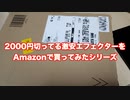
2000円しないで買えるエフェクターがAmazonにありましたので 買って紹介してみました。
Isetエフェクター
https://amzn.to/3vy6DNL
ギターはGibson Lespaulで弾いてみました。
【Effects Bakery】 Croissant Distortion & An Bread DI 【ギターエフェクター】

Effects Bakeryの低価格エフェクター
"Croissant Distortion"と"An Bread DI"のみでライン録りしてみました。
An Bread DIのAmp SimはoffでAudio I/Fとバランスで接続しています。
エフェクターは上記二つのみ、音の加工はしていません。
セッティング
Guitar --> Croissant Distortion --> An Bread DI --> Audio I/F (Balanced)

Logo Reveal Animation After Effects Template 林一記
This is the perfect way to elevate your brand! With this Mogrt Template for Premiere Pro you may simply replace the text with your own or with your URL and swap the placeholder logo with your own custom logo. You will have your very own custom logo reveal animation in minutes! Adobe Premiere Pro Ultra HD 3840 x 2160 Professionally Organized Easy To Edit Easy To Change All Colors
Logo Reveal Animation After Effects Template 林一記
Logo_Reveal_Animation_After_Effects_Template 林一記

This is the perfect way to elevate your brand! With this After Effects Template you may simply replace the text with your own or with your URL and swap the placeholder logo with your own custom logo. You will have your very own custom logo reveal animation in minutes! After Effects 2017 & Later Ultra HD 3840 x 2160 Professionally Organized Easy To Edit Easy To Change All Colors
Logo_Reveal_Animation_After_Effects_Template 林一記
Logo Reveal Animation After Effects Template 林一記
This is the perfect way to elevate your brand! With this After Effects Template you may simply replace the text with your own or with your URL and swap the placeholder logo with your own custom logo. You will have your very own custom logo reveal animation in minutes! After Effects 2017 & Later Ultra HD 3840 x 2160 Professionally Organized Easy To Edit Easy To Change All Colors
Logo Reveal Animation After Effects Template 林一記
Credit Card Recto And Verso With Glitch Effect 王鉄成
Animation of a detailed credit card sample with glitch and twitch vintage effects
Credit Card Recto And Verso With Glitch Effect 王鉄成
Bitcoin Crypto Currency Icon Technology Glitch FX 王鉄成

4k animation of an abstract bitcoin currency money icon with glitch textures and digital artifacts and noise effects. Bitcoin Crypto Currency Icon Technology Glitch FX 王鉄成
Business Growth And Success Arrow Infographics 王鉄成
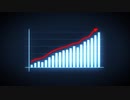
4k animation of a business infographics with rising arrow and bar stats appearing, symbolizing growth and success, with glitch and noise digital effects
Business Growth And Success Arrow Infographics 王鉄成
Ground Glass Parallax 4K Opener After Effects Template 王鉄成

This Project works excellent for aerials and top down photography but also works well with facing forward footage as well. Stacked layers in 3D space reveal your content in a parallax motion. Magnificent overlays enhance your photos and videos into a unique visual experience. A professionally designed After Effects opener template. This extremely easy to use template has a built in menu system to allow swapping out the text and image placeholders with ease. Featuring 10 title placeholders and 10 image placeholders. This project can output in 1080P and 4K. You can easily add your logo in or deliver a custom message with eye-candy. This template is animated to showcase your photos/video in an overhead aerial fashion.Ground Glass Parallax 4K Opener After Effects Template 王鉄成
Ground Glass Parallax 4K Opener After Effects Template 王鉄成

Magnificent overlays enhance your photos and videos into a unique visual experience. A professionally designed After Effects opener template. This extremely easy to use template has a built in menu system to allow swapping out the text and image placeholders with ease. Featuring 10 title placeholders and 10 image placeholders. This project can output in 1080P and 4K. You can easily add your logo in or deliver a custom message with eye-candy. This template is animated to showcase your photos/video in a designed slide fashion.Ground Glass Parallax 4K Opener After Effects Template 王鉄成
今さらSoftimageで作った映像集
制作にはBlenderも少し使ってます
動画一覧はこちら:
https://www.youtube.com/channel/UCXgF8Ix9srReo7jyLAz52qg/videos
SoftimageにはBlenderのCyclesレンダーが使える
「Cycles for Softimage(Sycles)」なるものがありまして それでレンダリングしてます
2020年7月~2021年3月で作成した映像をまとめたものです
使用ソフト:Softimage,Blender,Substance Painter,After Effects,Premiere
Music:
Passion Red Flamenco by shimtone
https://dova-s.jp/bgm/play12582.html
https://dova-s.jp/
Modern Typography Titles After Effects Template 王鉄成

These modern typography titles are everything you need to showcase your videos and photos. Perfect for social media videos and intro graphics. Easily change text and swap visual placeholders and adapt the colors to fit your use case to get noticed. After Effects 2017 & Later Ultra HD 3840 x 2160 Professionally Organized Add Photos Or Videos Duration 10 Seconds Easy To Edit Texts Easy To Change All Colors
Modern Typography Titles After Effects Template 王鉄成
4k-abstract-world-map-alpha-textured-background-fx-seamless-loop-clip 林一記

4k animation of business hi-tech background with flat earth planet rotating and hud infographics effects
4k-abstract-world-map-alpha-textured-background-fx-seamless-loop-clip 林一記
Videezy_Slideshow 山本秀典 山本秀典大阪
This Project works excellent for aerials and top down photography but also works well with facing forward footage as well. Stacked layers in 3D space reveal your content in a parallax motion. Magnificent overlays enhance your photos and videos into a unique visual experience. A professionally designed After Effects opener template. This extremely easy to use template has a built in menu system to allow swapping out the text and image placeholders with ease. Featuring 10 title placeholders and 10 image placeholders. This project can output in 1080P and 4K. You can easily add your logo in or deliver a custom message with eye-candy. This template is animated to showcase your photos/video in an overhead aerial fashion.
Videezy_Slideshow 満吉亮介
Hip-Hop themed event Promo with custom shape layer animations and a Custom Videezy Music Track for you to use exclusively with this project! Stacked layers in 3D space reveal your content in a parallax motion. Magnificent overlays enhance your photos and videos into a unique visual experience. A professionally designed After Effects opener template. This extremely easy to use template has a built in menu system to allow swapping out the text and image placeholders with ease. Featuring 10 title placeholders and 10 image placeholders. This project can output in 1080P and 4K. You can easily add your logo in or deliver a custom message with eye-candy. This template is animated to showcase your photos/video in an event promo fashion.Videezy_Slideshow 満吉亮介
Videezy_Slideshow 満吉亮介
Magnificent overlays enhance your photos and videos into a unique visual experience. A professionally designed After Effects opener template. This extremely easy to use template has a built in menu system to allow swapping out the text and image placeholders with ease. Featuring 10 title placeholders and 10 image placeholders. This project can output in 1080P and 4K. You can easily add your logo in or deliver a custom message with eye-candy. This template is animated to showcase your photos/video in a designed slide fashion.Videezy_Slideshow 満吉亮介
【不衛生】ダンジョンを蝕む 【オリジナル曲】

夜な夜な歯が痛むストレスから解放を望み、ロキソニンの代用に作られました。
歯磨きは自分磨きでなんとかかんとか。
※歌のピッチ補正はしてません、脳内で補完してください。
作曲:米澤元帥
→https://twitter.com/doronucha32
作詞:阿九悠
→https://twitter.com/doronucha32
編曲:鶯谷高位置
→https://twitter.com/doronucha32
動画:勝負下着T太郎
→https://twitter.com/doronucha32
歌は苦手です、誰か歌ってください。
ギターは苦手です、誰か弾いてください。
打ち込みは苦手です、誰か打ち込んでください。
仕事は苦手です、お金をください。
DAW:StudioOne4
映像:After Effects
オーディオインターフェイス:AG03
マイク:MPM1000U
Amp Simulator:zoom g5n
guitar:中古のメキシコjazzmaster
尊敬する人https://www.youtube.com/channel/UCWYd9WoRCIszyTMvbwnRS4w
Metal系ペダル最凶?!DOD FX86B Death Metal Distortionを使ってみたの巻
数あるMetal系ペダルの中でも、最も凶々しいと呼び声の高いエフェクターを手に入れましたのでGuitarとBassに使ってみました。簡単なオケも作ってみましたので、参考になりましたら幸いです。
【原神MMD】テオ ft. フィッシュル
ふつくしい
使用した素材のすべての権利者に感謝の意を表します。
Music: Omoi
Model: miHoYo co., ltd.
Stage: @Ai
Motion: Seto
Effects: Rui, おたもん, 化身バレッタ, そぼろ, 針金P
Please do not reupload without permission.
無断転載はしないでください。
未经允许,禁止转载。
【創作】「Chaos;Gate」10周年記念告知

オリジナル小説「Chaos;Gate」10周年を記念して制作した告知動画です。動画初作品になります。
■絵・動画■
米飯
Twitter:https://twitter.com/beihann2525
pixiv:https://www.pixiv.net/users/1095861
■原作■
「Chaos;Gate」
https://www.pixiv.net/novel/show.php?id=201913
■BGM■
Planetoid(GT-K)
https://dova-s.jp/bgm/play2575.html
■使用ソフト■
after effects/premire pro/CLIP STUDIO PAINT
【東京事変】 透明人間/guitar cover【大人】
使用機材
fender duo-sonic hs
effects bakery plain bread compressor
strymon iridium
STEINBERG UR22mkII
zoom Q4n
Twitterの方もどうぞよろしくお願いします
https://twitter.com/hatopopporn11
一部を表示
【MMD】『ゆめゆめ/Yume Yume』戌神ころね(inugamikorone) [4K 60fps]
![【MMD】『ゆめゆめ/Yume Yume』戌神ころね(inugamikorone) [4K 60fps]](https://nicovideo.cdn.nimg.jp/thumbnails/38311212/38311212.19461705)
[Music]
「ゆめゆめ」
作詞・作曲:DECO*27 vocal初音ミク
お借りしたモデル、背景、モーションなど
[Model]
戌神ころね 公式配布モデル Ver1.02 ©2019 cover corp.
[Motion]
yuji様
sm24432739
[Stage]
まぁぼ様
im6491371
[Effects]
ray-mmd-1.5.0, AutoLuminous, Diffusion,g_RimLight,ikBokeh,ikClut,CheapLens,AutoGradation,
ikOverray,MotionBlur,KiraKira_Z_Sphere
[MMDエヴァ] ワールズエンド・ダンスホール / World's End Dancehall
![[MMDエヴァ] ワールズエンド・ダンスホール / World's End Dancehall](https://nicovideo.cdn.nimg.jp/thumbnails/38297029/38297029.44736248)
- model: mqdl, Sour, TDA, sera, Kurauchi, spaghetti code
- motion: SEGA, Seto, Minmode
- effects: そぼろ, 針金P
- stage: NURU
youtube: https://youtu.be/Px_rD7IiV_o
【08年PVP資料】オンナスキーP型ワークフローにおける画面の変遷(4)
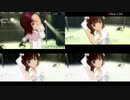
元動画: sm38276912
アイマスMAD黎明期にはオンナスキーPによる優れた手引き[1]があり, 私を含め多くの映像編集初心者がそれを手本にMADを作成しました. 現在はゲーム映像のキャプチャから編集までスマートフォン1台で熟せるようになり全く隔世の感がありますが, 古い時代の資料としてオンナスキーP型ワークフローにおける各工程の画面の変遷を纏めたものを投稿します.
1. https://web.archive.org/web/20170429235909/http://anto.sub.jp/imasmad.htm (web.archive.org による 2017/04/29 のアーカイブ. オリジナルはhttp://anto.sub.jp/imasmad.htm)
(1)選曲, BPM測定, 構想.
(2)AUTOカメラでキャプチャしフレーム番号とビート信号を載せた仮組み用映像で仮組み [画面左上]. Premiere Pro で作業.
(3)本組み用のキャプチャ. 各ダンスおよび衣装につきUP(オート), MID, LONG, WIDE(Super Long)の最低4本をキャプチャ.
(4)本組み [画面右上]. 素材が足りなければ適宜(3)に戻る
(5)色調補正 [画面左下]. ここから必要に応じて Adobe After Effects に移行. Magic Bullet Looks または Synthetic Aperture で主にカーブを使って RGB Waveform を満遍なく使うように調整. 好みで Magic Bullet Looks の Diffusion を少しかけることが多い
(6)その他 After Effects の expression を使うような表現やデータモッシュ, グリッチを加えて完成 [画面右下]
【08年PVP資料】オンナスキーP型ワークフローにおける画面の変遷(3)
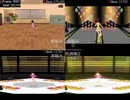
元動画: sm35308268
アイマスMAD黎明期にはオンナスキーPによる優れた手引き[1]があり, 私を含め多くの映像編集初心者がそれを手本にMADを作成しました. 現在はゲーム映像のキャプチャから編集までスマートフォン1台で熟せるようになり全く隔世の感がありますが, 古い時代の資料としてオンナスキーP型ワークフローにおける各工程の画面の変遷を纏めたものを投稿します.
1. https://web.archive.org/web/20170429235909/http://anto.sub.jp/imasmad.htm (web.archive.org による 2017/04/29 のアーカイブ. オリジナルはhttp://anto.sub.jp/imasmad.htm)
(1)選曲, BPM測定, 構想.
(2)X432Rで SoftRasterizer を使用したキャプチャは大変重たいので仮組みを2回行う. ステージ->ステージデータを編集->カメラ->詳細カメラでキャプチャしフレーム番号とビート信号を載せた仮組み用映像で仮組み [画面左上]. Premiere Pro で作業.
(3)再仮組み用のキャプチャ. 各ダンスおよび衣装につきUP3種類, MID3種類, LONG, WIDE(Super Long), STG の8本をキャプチャ.
(4)再仮組み [画面右上]
(5)本組み用のキャプチャ. カハマルカの瞳を使ってデスクトップ毎キャプチャするという力技.
(6)本組み [画面左下].
(7)Adobe After Effectsに移行し, 色調補正その他を加えて完成 [画面右下].
【08年PVP資料】オンナスキーP型ワークフローにおける画面の変遷(2)
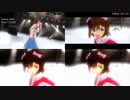
元動画: sm28801759
アイマスMAD黎明期にはオンナスキーPによる優れた手引き[1]があり, 私を含め多くの映像編集初心者がそれを手本にMADを作成しました. 現在はゲーム映像のキャプチャから編集までスマートフォン1台で熟せるようになり全く隔世の感がありますが, 古い時代の資料としてオンナスキーP型ワークフローにおける各工程の画面の変遷を纏めたものを投稿します.
1. https://web.archive.org/web/20170429235909/http://anto.sub.jp/imasmad.htm (web.archive.org による 2017/04/29 のアーカイブ. オリジナルはhttp://anto.sub.jp/imasmad.htm)
(1)選曲, BPM測定, 構想.
(2)AUTOカメラでフレーム番号とビート信号を載せた仮組み用映像で仮組み [画面左上]. Premiere Pro で作業.
(3)本組み用のキャプチャ. 各ダンスおよび衣装につきUP(オート), MID, LONG, WIDE(Super Long)の最低4本をキャプチャ.
(4)本組み [画面右上]. 素材が足りなければ適宜(3)に戻る
(5)色調補正 [画面左下]. ここから必要に応じて Adobe After Effects に移行. Magic Bullet Looks または Synthetic Aperture で主にカーブを使って RGB Waveform を満遍なく使うように調整. 好みで Magic Bullet Looks の Diffusion を少しかけることが多い
(6)その他 After Effects の expression を使うような表現やデータモッシュ, グリッチを加えて完成 [画面右下]
【08年PVP資料】オンナスキーP型ワークフローにおける画面の変遷(1)
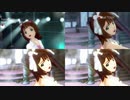
元動画: sm25675646
アイマスMAD黎明期にはオンナスキーPによる優れた手引き[1]があり, 私を含め多くの映像編集初心者がそれを手本にMADを作成しました. 現在はゲーム映像のキャプチャから編集までスマートフォン1台で熟せるようになり全く隔世の感がありますが, 古い時代の資料としてオンナスキーP型ワークフローにおける各工程の画面の変遷を纏めたものを投稿します.
1. https://web.archive.org/web/20170429235909/http://anto.sub.jp/imasmad.htm (web.archive.org による 2017/04/29 のアーカイブ. オリジナルはhttp://anto.sub.jp/imasmad.htm)
(1)選曲, BPM測定, 構想.
(2)AUTOカメラでフレーム番号とビート信号を載せた仮組み用映像で仮組み [画面左上]. Premiere Pro で作業.
(3)本組み用のキャプチャ. 各ダンスおよび衣装につきUP(オート), MID, LONG, WIDE(Super Long)の最低4本をキャプチャ.
(4)本組み [画面右上]. 素材が足りなければ適宜(3)に戻る
(5)色調補正 [画面左下]. ここから必要に応じて Adobe After Effects に移行. Magic Bullet Looks または Synthetic Aperture で主にカーブを使って RGB Waveform を満遍なく使うように調整. 好みで Magic Bullet Looks の Diffusion を少しかけることが多い
(6)その他 After Effects の expression を使うような表現やデータモッシュ, グリッチを加えて完成 [画面右下]