キーワード settings が含まれる動画 : 388 件中 353 - 384 件目
種類:
- タグ
- キーワード
対象:
新作クトゥルフゲー!The Sinking City 日本語化!
個人用のメモ程度の動画です。自己責任で。
編集済みのSettings.sav
https://drive.google.com/open?id=1CM6BmRIjeDe2TfUwUGcWji-iVVFkbz6i
ドライブ:
\Users\ユーザー名\AppData\Local\TSCGame\Saved\SaveGames
のSettings.savを編集(置き換え)
非steamゲーム(オーバーレイ込)の登録方法: 1:39
epic無しでも動くのは内緒
背景の画像(白上フブキ):
https://twitter.com/ShumeiaMist/status/1099512441438760960?s=09
ついで: https://nico.ms/sm35223669
【デレステ】 Androidエミュレータ MVテスト

パソコンの大画面でミュージックビデオ鑑賞したかったんや…
---動かすまでの手順---
・アンドロイドエミュレータAndy(http://www.andyroid.net/)をPCにインストール
・仮想Androidにストア経由でデレステをインストール
・Andyをroot化(ググッてねっ)
・GLtools(仮想GPUソフト、ストア版は有料$2.99)をインストール
(広告付き無料バージョン、http://forum.xda-developers.com/showpost.php?p=54409870)
・GLtoolsの設定でデレステを選択し、「Enable custom settings for this app」、
「Use Fake GPU info」の項目をチェック、
「Use a Tmplate」の項目を 「Adreno 320」に選択。
・デレステをプレイ
・テスト環境:win7 Corei5-2500+定格 GPU:RadeonHD5850
ようつべ(HD画質) https://www.youtube.com/watch?v=Gq-oxH3Pc4Q
osu! Cirno's Perfect Math Class [insane]
![osu! Cirno's Perfect Math Class [insane]](https://nicovideo.cdn.nimg.jp/thumbnails/13804353/13804353)
Player:AnkoroMamE
Mouse Only ;)
Video Setting
DirectX Windows mode 1024x768 (frame Limiter:Unlimited)
Mouse 1.0x 400dpi (IE3.0)
Detail Settings
ON OFF OFF OFF OFF OFF OFF OFF
Audio Offset -5ms
【PC】Grand Theft Auto V Field of View Mod 【MOD】

FOVの値を任意に設定出来るMODです(※一人称視点のみ)
マルチディスプレイ環境の人は設定によって不具合が出るかもしれません。この動画ではデフォルトの68になってます。
*Download*https://mods-gtav.com/submissions/custom-field-of-view
❏PC Settings
CPU:i7 4790K
GPU:980SLI
PSI:Corsair RM1000W
Mem:32G
❏Graphic Settings
Resolusion:3840x2160 (4K)
Shadow以外Ultra
4Kを720Pにリサイズしてるのでかなり劣化してますが容量的にご了承ください。
【520円】アーバンストリートファイト Player VS CPU RTA 28秒08
初投稿です。
Switch版タイトル「Urban Street Fighting」
Steam版タイトル「Urban Street Fighter」
タイトルは違いますが同じ作品です。
私が世界一です。
>Timer starts as soon as the loading appears on the stage select screen and ends on the last hit. Any settings can be used.
(Speedrun.comより引用)
計測開始はステージを選んで「LOADING...」の文字が表示された瞬間。計測終了は最終ヒットの瞬間。設定は自由(私は最低難易度にしました)(他走者も多分そうしています)
無編集版: https://youtu.be/LRb2yXkVnfI
タイムリープ ベンチマーク 32x CSAA Ver.

|Driver settings> 32X CSAA + 8X TSAA + 16X AF Texture filtering: High quality |Afterburner 2.2.0 review> uncompressed format: Best quality RTV1: Poor quality MJPG: Drop frames |Paranoid encoding settings> 16:9 crop aspect ratio pass 2, ref 16, me tesa, subme 10, me-range 32, bframes 16, rc_lookahead=250, no-fast-pskip, slow-firstpass
オワタツジン「意味不明2000」

どのようの意味不明かは、見てから確かめてください。無音です。鬼畜過ぎるのは、愛嬌ということでwww 自作です。そして、途中から、点数のところがおかしくなってきているのはなぜ?C:\Documents and Settings\KOUTA\デスクトップ\オワタツジン\無音\go.htmlコピペしたらできる
【GTA4】ENB導入の参考にでも【ENB】

新しくGTA4をインストールし、パッチ1.0.4.0にしました。この動画では、環境影や反射率、ライトのエフェクト、雲の形などが変わっていることが分かると思います。少し白っぽい(色が薄い)のは原因不明で、普通ならもっと濃いです。ENBについてやって欲しいことなど、できる限り受け付けたいと思います。このゲームについて質問があればお答えします。次→sm13317064 【使用ENB】「GTAIV Extreme Graphics」「Bone ENB Settings v1.0」それぞれを組み合わせています。GTAIV Extreme Graphicsは道路のテクスチャも変わります。 【スペック】OS Win7 32bit, CPU Phenom Ⅱ X4 965 BE, GPU nVidia GeForce GTX 460 768MB, メモリ 4G 初期状態ですとヌルヌル動きます。
FSX - Bell 206B JetRanger in Autorotation

Power-off autorotation landings in a default Bell 206B JetRanger helicopter in Flight Simulator X with all realism settings set to maximum. → http://www.youtube.com/watch?v=XBUe2zNKGYg
【リリカルなのは】お遊戯会でお披露目練習中のおねぃさんがこちらです~Little Wish with AZUKI short~【ホロライブMMD】

ヴィータ扮するあずき吉がお遊戯練習の一コマです。
無料公開のなのはA’sも引き続き26日から始まるので楽しみですね。
最新作「魔法少女リリカルなのはEXCEEDS Gun Blaze Vengeance」2026年7月放送開始記念用動画
公式こちら→https://www.youtube.com/channel/UCryNrgY4lfJgYkhMNgwHPMg
お借りしたもの
音源:【HD】部活中に弾いてみた【Little Wish -Lyrical step-】/くすのきるい様 >ベースアップ楽曲のみ抽出
→https://www.youtube.com/@ruikusunoki
:ホロライヴ AZUKI様 歌枠 >歌ってみたからボーカルのみ抽出
→https://www.youtube.com/@AZKi
VMDSpectrum_0002 /極北P様
>波形(wav)ファイルのスペクトルデータをモーションファイル(.vmd)に変換するツール
Free Online AI Vocal Remover & Isolator→https://poppop.ai/ai-vocal-remover
METIVE →https://www.metive.app/login?redirect_to=%2Feditor%2F
MMDアクセ:各種 某なのはデバイスその1/紫様
model:ホロライブ公式 AZUKI様
ステージ:This download contains MMD work by SAB64.
Super Mario and all related characters, settings, objects, media, etc. (C) Nintendo.
この作品は多くの有志の方で成り立っております。心より感謝申し上げます。
*本動画は学習と交流のみを目的としており、商業用途や営利目的ではございません。
*This video is intended for learning and communication purposes only, not for commercial use or profit.
【創作論破】マジカルロンパ キャラクター&CV公開 PV1

▶️キャラクター、キャラクターCVの公開動画のフルverとなっています
□第一弾□
▸ライト・ホルプス│CV.きりゅまき。
▸ファウスト・クラウゼ│CV.ロア
▸リル・エルピス│CV.相羽みあ
▸ノア・マーブル│CV.羽田オリ
【ATTENTION】
・マジカルロンパとは、ダ/ン/ガ/ン/ロ/ン/パ/の一部設定、世界観をお借りし作成した非公式二次創作作品です。
・ゲームプレイ画面風の二次創作動画となっています。
Magical Romper is an unofficial derivative work created by borrowing some of the settings and worldviews from Da nga ng Rompa.
It is an original video in the style of a game play screen.
公式X(旧Twitter)→@MAGICAL_R
【東方】霊夢:ざぁこざぁこざぁこ

!!Japanese is not my native or second language, and I must use translation software to understand it.!!QwQ But I will try my best to understand.
The original version of this video comes from 柊マグネタイト
Music:“雑魚” 柊マグネタイト(Train 'Yukkuri' to cover songs using RVC AI model.)
Very, very special thanks to tixdk for creating the video cover image(
I originally planned to make the complete version, but I couldn't do it anymore because there was a problem with the initial settings of the project, and the shape layer caused the AE to occupy too much space
I plan to work hard to redo the entire project and complete the full version later, but I have decided to release what has already been done first.
MY BILIBILI https://space.bilibili.com/11897608
MY Twitter https://twitter.com/touhou_fylm

【紅蓮華(鬼滅の刃OP)】エアロフォンで演奏してみた / GURENGE - Demon Slayer OP | Aerophone Cover (Kimetsu no Yaiba)
エアロフォンを買ったので鬼滅の刃OP「紅蓮華(LiSA)」をエアロフォン(Aerophone AE-10)で演奏してみました
音色は尺八です
タンギングとビブラートの設定がよく分からないけど、運指はサックスと同じなのでサックス吹きは吹きやすいかも
音源は下記リンクから
(https://www.youtube.com/watch?v=D_dgilMwDbM)
Aerophone AE-10 Cover of GURENGE - Demon Slayer OP (Kimetsu no Yaiba)
Sound is Shakuhachi.
I need to learn more about tonguing and vibrato settings.
Fingering is same as saxophone.
Twitter
https://twitter.com/martylabo

【数音ヨシ連続音】 よしよしにしてあげる♪ 【してやんよ】

Kazune est finit~! ■ Original (sm1097445) ■ New design by me. View here: http://www.pixiv.net/member_illust.php?mode=medium&illust_id=7525506 ■ VB download: http://www.mediafire.com/download.php?nezjqzutymz Sorry it's not axfc... ■ Sorry for any bad translations... =.=' ■ Settings: Y0H-10g-5
【BeatSaber】fpsVRで性能表示
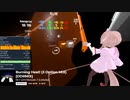
PC: HP ENVY x360 15-cp0000
CPU: AMD Ryzen5 2500U 2.0GHz
GPU: AMD Radeon Vega 8 Graphics
RAM: DDR4 PC4-19200 16GB
HMD: Dell Visor with Controllers
BeatSaberが非ゲーミングPCでどこまで動くか確認しました。
低スペック設定でGPUのフレームレートが19~25fps、PC起動直後なら辛うじてゲームができる程度です。
ちなみにRADEON SettingsではBeat Saberは「お使いのシステムは、このゲームの最低要件を満たしておりません」と判定されます。
海を越えて行く Go across The sea 【BGM】
不思議な冒険へと誘う魅惑的なBGMです。この音楽は、聞く人を海の彼方へと連れ出し、見知らぬ世界を探索する旅へと導きます。奇妙で奥深いメロディーが感情を揺さぶり、心の中に秘めた冒険心を呼び覚ますことでしょう。さまざまなシーンでの使用に最適で、想像力をかき立てる瞬間を創造することができる一曲です。This enchanting background music takes the listener on a magical adventure across the sea. This music takes the listener beyond the sea and leads him or her on a journey to explore an unknown world. The strange and profound melodies will stir your emotions and awaken the adventurous spirit hidden within you. Ideal for use in a variety of settings, this is a piece of music that will allow you to create imaginative moments.https://twitter.com/nojisuman2525 download https://nojimusic.base.shop https://www.motionelements.com/ja/artists/nojisuma https://patreon.com/NojiSuma?utm_medium=clipboard_copy&utm_source=copyLink&utm_campaign=creatorshare_creator&utm_content=join_link
MakeAStory

ーあなたの行動が物語を作るー
ブラウザゲームMakeAStoryのプレイ動画です。
unityroomさんにてブラウザで遊んでいただけます
URL: https://unityroom.com/games/makeastory_onigokko/settings/gameplay
ゲーム内容
1プレイ数分の、シンプルな鬼ごっこゲームです。
追いかけてくる敵から逃げたり、アイテムを取って敵を倒したり、あえてやられてみたり…
どんなキャラクターのストーリーだったのか、あなたのとった行動によって変化します。
ゲームオーバーはないので、様々な行動を試してみてください。
エンディングの世界観はファンタジーRPGをイメージしています。
制作:unity
プレイ時間:1プレイ3分以内

[HAKU] I'll Give Up Singing [VOCALOID] 辞めてやるよ歌い手
![[HAKU] I'll Give Up Singing [VOCALOID] 辞めてやるよ歌い手](https://nicovideo.cdn.nimg.jp/thumbnails/18210852/18210852)
My first upload to Nico! VSQ - sango312 on YouTubePicture - keichan411 from DeviantArtI know there's another cover of Haku singing this out there (probably a LOT more than I realize), but it doesn't hurt to do one myself, right?Made in Vocaloid (Miku voice with settings changed), then pitched down in Audacity to make it sound even more like Haku. I hope you enjoy!
【VRChat】OVRでできる事【OVR Advanced Setting】
OVR Advanced Settingが2024年4月15日に有料化するので
無料のうちに導入する人は急ぎましょう。
https://store.steampowered.com/app/1009850/OVR_Advanced_Settings/?l=japanese
【オリ棒】【借り】PV【やめてください】

音源様
https://youtu.be/JijOz4Rvzn8
睦月IAです
今回は見た目が変わるオリを借りて、描いてみました
覚醒とか暴走とか、ふと描きたいなって思って、描きたい人に声かけてきました
かっこいいデザインばっかりで
もうテンション上がります
かして下さった皆様、ありがとうございました!
借りた人
@PEI9KrfNBObAkau
@mikek_312
@NGot_6829
@Nialal_
@H2O59581718
@GzsPv
@1004NON_MARU
@VajGzr
@k64979493
@BANRU114514
@Rui_1811
@The_Chaos_0821
@1101HRMsecand
@Gussan_0817
@Smokyquartz07
@akaberasan_
@grape5562
@akurieru_0824
@Cian_1112
@Se2_rei39_
@midoro1116
@JkgoyTGFDhnq6ns
@kanade_110
チャンネル登録→https://www.google.co.jp/settings/u/0/personalinfo
ツイッター→https://twitter.com/IA43722117
Tension Escalates During an Incident at a Billiards Club
This video appears to capture a tense moment inside a billiards club, where a confrontation suddenly draws the attention of everyone nearby. Several individuals can be seen gathering around a pool table as the situation unfolds, creating an atmosphere of confusion and concern.
Incidents like these serve as a reminder of how quickly disagreements can escalate in public places. Maintaining self-control, communicating calmly, and seeking peaceful solutions are often the best ways to prevent conflicts from becoming more serious.
Billiards clubs and recreational venues are meant to be places for relaxation, entertainment, and social interaction. Respect for others and responsible behavior help ensure a safe environment for everyone present.
The footage has generated discussion online, with many viewers reflecting on the importance of conflict resolution and public safety in social settings.
🎱 Recreation • Community • Awareness

【Twitter】副業テンプレワードを一括ミュートする方法 #副業 #Twitter
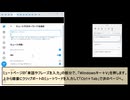
ミュートリスト
https://twitter.com/tokumewi/status/1570691270401740807
ミュート登録画面
https://twitter.com/settings/add_muted_keyword
nwhoisからNiconamaCommentViewerへのコテハン移行

nwhoisの更新が止まってしまい他のコメビューへ移行した/したい人向けの動画です
必ずファイルのバックアップを取ってから行ってください
下記がそれぞれの設定ファイルです
C:\Documents and Settings\%username%\Local Settings\Application Data\nwhois\data\database\log3.sqlite
C:\Documents and Settings\%username%\Application Data\posite-c\NiconamaCommentViewer\UserSetting.xml
SQLの一例(除く184リスナー)
・コメビュで色の付いているリスナー
SELECT cid,color,name,1325343599 AS reg_time FROM user WHERE color <> -1 AND LENGTH(id) <> 27
・コミュco9999の生放送リスナー
SELECT cid,color,name,1325343599 AS reg_time FROM user WHERE cid = 'co9999' AND LENGTH(id) <> 27

G'MICによる動画処理
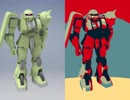
途中、激しく点滅するので閲覧注意です。
Autodesk Inventorで設計・レンダリングした画像に画像処理を施してみました。
左が元画像、右が処理後の画像です。音なし。
画像処理ソフトはGIMP2.8、G'MICプラグイン、BIMPプラグイン。
G'MIC Settings ↓
[G'MIC] Halftone: fx_halftone 0,0,-24.2,0,15,9,7,5,0,0,50,50
[G'MIC] Hope Poster: fx_poster_hope 0.2,0.1,0,50,50
[G'MIC] Oldschool 8bits: fx_8bits 20,6780,16,0,50,50
[G'MIC] Polygonize [Delaunay]: fx_polygonize_delaunay 39.6,5,75,0.5,3,50,0,0,0,255,1,0,50,50
[G'MIC] Stained Glass: fx_stained_glass 30.5,0.08,1,1,1,0,0,0,0,50,50
[G'MIC] Thin Edges: fx_thin_edges 0.2,3,0,0,50,50
[G'MIC] Whirling Lines: fx_whirling_lines 14.3,35.7,0,0,0.45,40,60,0,0,30,0,3,3
[G'MIC] Wiremap: gcd_wiremap 94,132,0.1,0.97,0
[G'MIC] Finger Paint: gtutor_fpaint 0.5,0.5,0,0,45,0.5,0.5,0.5,0
[G'MIC] Fractalize: fractalize 0.83
[G'MIC] Pixel Sort: fx_pixelsort 1,0,0,1,0,100,0,0,0
投稿したやつ。 > mylist/64316510
Flash Playerの自動更新設定を使用しましょう! 川口洋のつぶやき 第47回

YouTubeから転載 12/14/2010 laccotv
Flash Playerは初期状態では30日ごとにアップデートの有無を確認しています。この設定はAdobeのサイトの「Adobe Flash Player 設定マネージャー」で行うことができます。
http://www.macromedia.com/support/documentation/jp/flashplayer/help/settings_manager.html
この設定マネージャーでは7日間まで設定することができますので、ぜひ期間を短くしておいてください。
また7日より短くしたい場合には以下のサイトを参考にして「mms.cfg」という設定ファイルを作ってください。
@IT Flash Playerの自動更新機能を設定する
http://www.atmarkit.co.jp/fwin2k/win2ktips/1061flashupdate/flashupdate.html
チーフエバンジェリスト兼セキュリティアナリストがお届けするここだけの話。Kawaguchi's Private Talk
Ameshin Yossarians SUPER Simple Lighting

Small tutorial on how to use (my) light settings for pictures / videos in Second Life.Over the past 8 years sometimes customers have gotten the impression I heavily modify my creations in photoshop.Lighting setting in Second Life can easily be adjusted to look "picture perfect" in only a few clicks without any paint program knowledge.(On a side note I've been a paint shop pro user for over 10 years =^.^= )