
キーワード settings が含まれる動画 : 385 件中 161 - 192 件目
種類:
- タグ
- キーワード
対象:
【ボイスロイド解説】ゲーミングPCによる仮想通貨マイニングにおけるGPUの違いと現況【補足1】
【朗報です☆】
◆今なら、以下の招待 URL からのbitFlyer口座開設で、1,000 円分のビットコインをプレゼント◆
https://bitflyer.com/invitation?id=b4lwudj0&lang=ja-JP
※スマホでアクセスしてください
※こちらの動画をご覧になる前に、以下の動画をご覧いただくことをお勧めします
①本編:【2021年度版】ゲーミングPCによる仮想通貨マイニング方法(NiceHash)をざっくりと解説【ボイスロイド解説】
https://www.nicovideo.jp/watch/sm38134725
③補足編②:【ボイスロイド解説】仮想通貨マイニング(Nicehash)で得た報酬を、日本円にする方法について開設【補足2】
『ボイスロイド 桜乃そら』が、Nicehashを用いたPCによる仮想通貨マイニング方法(2021年1月現在)を、マイニング初心者向けにざっくり解説する動画の第2回というか、第1回の補足です。
具体的に桜乃そらが使用しているGPUで、現状どれだけ稼げているのかご紹介します。
リグを組むような本格的なものではなく、ライトなGPU1枚でのマイニングを想定しています
また細かい技術説明は、ボイスロイドも苦手なためざっくりとした解説になりますのでご了承ください。
チャンネル登録よろしくお願い致します。
***************************************************************************************************
動画内で紹介したURLは以下の通りです。
NiceHash:https://www.nicehash.com/
GPUのオーバークロック設定:https://www.nicehash.com/blog/post/nvidia-and-amd-graphics-card-oc-settings-for-mining
***************************************************************************************************
ご質問等があればコメント欄へどうぞ
立ち絵:物見戸さん
ソーサリアン オリジナル・サウンドトラック/ Copyright © Nihon Falcom Corporation
タイムリープ ベンチマーク 32x CSAA Ver.

|Driver settings> 32X CSAA + 8X TSAA + 16X AF Texture filtering: High quality |Afterburner 2.2.0 review> uncompressed format: Best quality RTV1: Poor quality MJPG: Drop frames |Paranoid encoding settings> 16:9 crop aspect ratio pass 2, ref 16, me tesa, subme 10, me-range 32, bframes 16, rc_lookahead=250, no-fast-pskip, slow-firstpass
osu! Jehovah's YaHVeH [Lunatic]
![osu! Jehovah's YaHVeH [Lunatic]](https://nicovideo.cdn.nimg.jp/thumbnails/13985513/13985513)
Player:AnkoroMamE
Mouse Only ;)
Video Setting
DirectX Windows mode 1024x768 (frame Limiter:Unlimited)
Mouse 1.0x 400dpi (IE3.0)
Detail Settings
ON OFF OFF OFF OFF OFF OFF OFF
Audio Offset -3ms

[手元撮影] osu! nam5 - Heavenly Shake [Extra Stage]
![[手元撮影] osu! nam5 - Heavenly Shake [Extra Stage]](https://nicovideo.cdn.nimg.jp/thumbnails/14867688/14867688)
Player:AnkoroMamE
Mouse Only ;)
Video Setting
DirectX Windows mode 1024x768 (frame Limiter:Unlimited)
Mouse 1.0x 400dpi (IE3.0)
Detail Settings
OFF ON OFF OFF OFF OFF OFF OFF
Audio Offset 0ms
ウェブカメラで撮影しながらプレイ。
2回取り直しました。
【東方】霊夢:ざぁこざぁこざぁこ

!!Japanese is not my native or second language, and I must use translation software to understand it.!!QwQ But I will try my best to understand.
The original version of this video comes from 柊マグネタイト
Music:“雑魚” 柊マグネタイト(Train 'Yukkuri' to cover songs using RVC AI model.)
Very, very special thanks to tixdk for creating the video cover image(
I originally planned to make the complete version, but I couldn't do it anymore because there was a problem with the initial settings of the project, and the shape layer caused the AE to occupy too much space
I plan to work hard to redo the entire project and complete the full version later, but I have decided to release what has already been done first.
MY BILIBILI https://space.bilibili.com/11897608
MY Twitter https://twitter.com/touhou_fylm
FSX - Bell 206B JetRanger in Autorotation

Power-off autorotation landings in a default Bell 206B JetRanger helicopter in Flight Simulator X with all realism settings set to maximum. → http://www.youtube.com/watch?v=XBUe2zNKGYg
【PC】 Rainbow Six Siege Highlights #17

ちょっと暗過ぎたね
r6s Settings
DPI xy400
X&Y : 10:10
AIM 64
Aspect Ratio 16:10 and 5;3 and 3;2
120Hz
FOV 90
fallout4 MOD導入テストプレイ-fallout4 mods test play -
初めてのMOD導入なのでテスト動画です。
使用したMODの名前と効果を紹介しておきます(文字数制限のため一部のみ紹介)
[キャラクター関連]
・ Caliente's Beautiful Bodies Enhancer - v2.6.3
体系の変更、裸スキンの追加
・ LooksMenu
キャラメイクの幅を広げる。基本は別ファイルのプリセットを使うと楽。
・ Commonwealth Cuts
髪型の追加
・ Female Outfit replacer with Vanilla shoes
バニラの衣装がうふふなモノに変更される。
・ JSRS Movement Sounds
足音の変更。装備や土地によって大きく変わる。個人的に一番好き。
・ Pip-Boy Flashlight
ライトを様々なタイプに変更できる。
[武器]
・ Combined Arms
近代的な武器をいくつか追加するパック。ケミストリーにて無限に取得可能。
・ Burst Impact Blast FX
着弾した時のパーティクルが増える。火花が広がって迫力が増す。
[環境・UI系]
・ Vivid Fallout - All in One - Best Choice
大規模にテクスチャを変更する。かなりリアルになる。
・ WET - Water Enhancement Textures
水のグラが上がる。テンションも上がる。RADも上がる。
・ Mod Configuration Menu
通称MCM。様々なMODをメニューからいじることができる。
基本的にはこれで以下のMODを使う。
・ Game Configuration Menu
通称GCM。名前の通りゲームの天候、時間などをいじられるようになる。
MCMから使える。
・ Reverb and Ambiance Overhaul
音が反響するようになる。室内ではかなり臨場感が増す。
・ Condensed Minimal FallUI - HUD
UIを自分でいじれる。が、プリセットを使った方が早いしクオリティも高い。
・ Nac X
主なフィルター。色々あって迷いがちだが、オススメはvivid(鮮やか)
ほかにも夜や室内の明暗も設定できる。
NAC X - MCM Settings Menu でMCMからいろいろいじくれる。
TrotMania IIIをやってみた パート2/3

今回はIIの楽曲を遊んでみます
http://trotmania.ponyvillefm.com
・ノートスキンについて
1、まずTrotManiaのダウンロードページから"Noteskins"をダウンロードして解凍します。
2、解凍すると出てくる3つのフォルダをNoteskinsフォルダの中にあるDanceフォルダに入れてください
3、本体を起動し、曲選択時のオプションでNOTESKINSの項目をいじるとノートスキンを変えることができます
・アナウンサーについて
今回使用したのはこちらです
http://www.mediafire.com/?48vie1hbi1e4gb6
解凍したフォルダ丸ごとAnnouncersフォルダに突っ込んでください
後は本体を起動し、タイトルのSETTINGSからAPPEARANCE OPTIONSを開いてANNOUNCERの項目を変更すればOKです。
sm28437450←前 次→sm28448058
【PC】 Rainbow Six Siege Highlights #16

最後はエンコミス
r6s Settings
DPI xy1350
X&Y : 4:4
AIM 54
Aspect Ratio 16:10
120Hz
FOV 90
【波音リツAI】耳のあるロボットの唄【NNSVSカバー】

曲: 【UTAU】耳のあるロボットの唄(オリジナル)【重音テト】[1]
使用歌声データベース: 「波音リツ」歌声データベース [2]
イラスト: kikunoji [3]
使用レシピ: nnsvs_namine_ritsu_utagoe_db [4]
1. https://www.nicovideo.jp/watch/nm3611741
2. https://drive.google.com/drive/folders/1XA2cm3UyRpAk_BJb1LTytOWrhjsZKbSN
3. http://canon-voice.com
4. https://github.com/taroushirani/nnsvs_namine_ritsu_utagoe_db
歌声はコンプ, EQ, リバーブをかけていますが, タイミングやピッチ補正はしておらず NNSVS の出力のままです.
NNSVS settings:
timelag model: FeedForwardNet num_layers: 2 hidden_dim: 128
duration model: RMDN num_gaussians: 4 num_layers: 2 hidden_dim: 256
acoustic model: RMDN with mlpg num_gaussians: 4 num_layers: 2 hidden_dim: 256 dim_wise: true
GoPro How To: Start Using Your HD HERO2 Camera

Quick start guide to learn the basics of using GoPro HD HERO2 camera.
0:08 - Installing the Battery
0:30 - Charging the Battery
0:56 - Inserting the SD Memory Card
1:11 - The Camera Housing
1:34 - Power ON / OFF & Shutter Select Buttons
1:53 - 4 Recording Indicator Lights
2:11 - 4 Photo Modes: Single, Photo Burst, Timelapse, Self Timer
3:24 - Changing Camera Settings
【Volの日常】ほろ酔い BF3【Kharg Island】

ハイボールうまい
自分のマイクは入ってません
BF動画:mylist/32984702
他の動画:mylist/24382269
我々Volと一緒にBF3(PC版)を楽しみませんか?メンバー募集中です。 http://wikiwiki.jp/vol/?joinus%3F
Output settings
Resolution:960x540
Video:H.264 1500kbps
Audio:AAC LC 64kbps
(アップロードテスト)霞と夕雲と白露三姉妹のMarine Bloomin IV 編集テスト
素ファイルステータス
Format : MPEG-4
Codec ID : M4V
File size : 225 MiB
Overall bit rate mode : Variable
Overall bit rate : 8800 Kbps
Encoded date : UTC 2021-01-10 13:35:01
Tagged date : UTC 2021-01-10 13:35:01
Writing application : L-SMASH
Format : AVC
Format/Info : Advanced Video Codec
Format profile : [email protected]
Format settings, CABAC : Yes
Format settings, ReFrames : 5 frames
Codec ID : avc1
Codec ID/Info : Advanced Video Coding
Duration : 3mn 34s
Bit rate : 8538 Kbps
Maximum bit rate: 17.9 Mbps
Width : 1920 pixels
Height : 1080 pixels
Display aspect ratio: 16:9
Frame rate mode : Constant
Frame rate : 60.000 fps
Color space : YUV
Chroma subsampling : 4:2:0
Bit depth : 8 bits
Scan type : Progressive
Bits/(Pixel*Frame): 0.069
Stream size : 218 MiB (97%)
Matrix coefficients: BT.709
マッチョカーニバル様
ニセOIC様
広告ありがとう御座いました
【にじさんじ】ましろくん描いてみた【speed_painting】
七度目まして、水景つかさと申します。
今回はにじさんじ公式ライバーのましろさんを描かせていただきました。
よろしくお願いします。
録画ソフトの設定をミスって画質がゴミです。
お蔵入りにしようかとも思いましたが、戒めのために投稿します。
成長しろ。
My name is Tsukasa Mikage, and this is my seventh drawing.
This time, I drew Mashiro-san, the official Niji-sanji lifer.
I hope you like it.
I made a mistake in the settings of my recording software and the picture quality is garbage.
I thought about putting it in storage, but I'm posting it as a reminder.
Grow up.
⋯⋯⋯⋯⋯⋯⋯⋯⋯⋯
▹Youtube→https://youtu.be/j4pS4MC5L9w
▹ましろさんのチャンネル → https://www.youtube.com/channel/UCfki3lMEF6SGBFiFfo9kvUA
Twitter → https://twitter.com/mashiro2434
▹僕のTwitter → https://twitter.com/tsukasa__mikage
[演奏してみた]You Raise Me Up [BassClarinet][バスクラ]
![[演奏してみた]You Raise Me Up [BassClarinet][バスクラ]](https://nicovideo.cdn.nimg.jp/thumbnails/27930361/27930361)
ケルティックゴリラ
本番演奏での一発撮り。ノイズやリードミス有り。編集荒め
Sheets:
http://brass.winds-score.com/?pid=87768882
Settings:
Selmer Privilege
RICO RESERVE Classic 3.0+
KODAMA Ⅱ
NAGAMATSU OMEGA
https://www.youtube.com/watch?v=hgI3X24KELY
G'MICによる動画処理
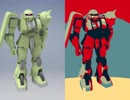
途中、激しく点滅するので閲覧注意です。
Autodesk Inventorで設計・レンダリングした画像に画像処理を施してみました。
左が元画像、右が処理後の画像です。音なし。
画像処理ソフトはGIMP2.8、G'MICプラグイン、BIMPプラグイン。
G'MIC Settings ↓
[G'MIC] Halftone: fx_halftone 0,0,-24.2,0,15,9,7,5,0,0,50,50
[G'MIC] Hope Poster: fx_poster_hope 0.2,0.1,0,50,50
[G'MIC] Oldschool 8bits: fx_8bits 20,6780,16,0,50,50
[G'MIC] Polygonize [Delaunay]: fx_polygonize_delaunay 39.6,5,75,0.5,3,50,0,0,0,255,1,0,50,50
[G'MIC] Stained Glass: fx_stained_glass 30.5,0.08,1,1,1,0,0,0,0,50,50
[G'MIC] Thin Edges: fx_thin_edges 0.2,3,0,0,50,50
[G'MIC] Whirling Lines: fx_whirling_lines 14.3,35.7,0,0,0.45,40,60,0,0,30,0,3,3
[G'MIC] Wiremap: gcd_wiremap 94,132,0.1,0.97,0
[G'MIC] Finger Paint: gtutor_fpaint 0.5,0.5,0,0,45,0.5,0.5,0.5,0
[G'MIC] Fractalize: fractalize 0.83
[G'MIC] Pixel Sort: fx_pixelsort 1,0,0,1,0,100,0,0,0
投稿したやつ。 > mylist/64316510
【クローク封印】日本語字幕版Crysis 2 最高難易度で初プレイpart 3/63

ここだけクローク発動
前:sm15253695 mylist/26695478 次:sm15255293
他の動画(warheadあり):mylist/24382269
In game settings
all extreme
Output settings
Resolution:960x540
Video bitrate:about 1600-1700kbps
Audio bitrate:64kbps
【創作論破】マジカルロンパ キャラクター&CV公開 PV1

▶️キャラクター、キャラクターCVの公開動画のフルverとなっています
□第一弾□
▸ライト・ホルプス│CV.きりゅまき。
▸ファウスト・クラウゼ│CV.ロア
▸リル・エルピス│CV.相羽みあ
▸ノア・マーブル│CV.羽田オリ
【ATTENTION】
・マジカルロンパとは、ダ/ン/ガ/ン/ロ/ン/パ/の一部設定、世界観をお借りし作成した非公式二次創作作品です。
・ゲームプレイ画面風の二次創作動画となっています。
Magical Romper is an unofficial derivative work created by borrowing some of the settings and worldviews from Da nga ng Rompa.
It is an original video in the style of a game play screen.
公式X(旧Twitter)→@MAGICAL_R
osu! REDALiCE - Bad Apple!!

配信中の出来事であった
Player:AnkoroMamE
Mouse Only ;)
Video Setting
OpenGL Windows mode 1024x768 (frame Limiter:Unlimited)
Mouse 1.0x 400dpi (IE3.0)
Detail Settings
ON OFF OFF OFF OFF OFF OFF OFF
【比較】F-ZERO GX: Chapter 8 バトルストリームvs.CGN(old)

Settings: 100% Max Speed Non-snake
バトルストリームさん 2'52"877
元動画 sm8354718
CrazyGameNerdさん 2'52"055
元動画 https://www.youtube.com/watch?v=QMYG09BeSpA
浮上加速がいかに大切かが分かりますね。
バトルストリームさんが更新した模様
https://www.youtube.com/watch?v=V3-QFGXeBGI
CGNさんが同日にさらに更新した模様
https://www.youtube.com/watch?v=TQXI7iHusuw
【UTAUカバー】Motherland【円舞曲アリーネv2.11】

(ごまんなさい。英語です。) UST/RPP: SkyIsland | Art: 6LIN | Hello everyminna! Here I come with a small update to Aline's oto.ini settings (and probably the last alteration I'll do to this voicebank, whew). XO | If you STILL DIDN'T download Enbukyoku Aline v2.1, I'll cut to the chase and link the v2.11 voicebank to you: http://www.mediafire.com/?ido2sxd6ltd0osk | But if you ALREADY downloaded her, you don't need to download the entire VB all over again. You only need to replace the oto.ini and the readme, since it comes with new usage instructions: http://www.mediafire.com/?3b3reevzhma9ait http://www.mediafire.com/?c9bucu9e66bp18y | If the oto or the readme present any problems or if you have any difficulties to use her, let me know! | (P.S.: Whoever has shareware UTAU over 4.0 can use the A button in the lower left corner to automatically convert stuff. How convenient!)
悲しみのジョディ ~She was crying~ 英語版

[About this Video] Recommended video settings: 1080HD60 Video Editor: Plum Murasaki This work is a covered by VioLuci
[About this Music]
Title:Kanashimi no Jody ~She Was Crying~
Language: Japanese Release date: June 8, 1983
Songwriting: Tatsuro Yamashita
Album: MELODIES Title: Jody
Language: English
Release date: June 20, 1984
Composed: Tatsuro Yamashita
Lyrics: Alan O'Day
Album: BIG WAVE
Cover information
Music Editor: Lucifera Satan & Viola Murasaki
Sound Work: Plum Murasaki
Recommended equipment: Headphones
[Relation keywords] #bigwave #melodies #summervibes
[Afterword] It was created in September 2022 and updated in 2024. Thank you very much.
《日本語訳》 Vハモ サマーソング2024 #夏の歌 #夏休み
【この楽曲について】
タイトル:悲しみのジョディ ~シー・ウァズ・クライング~
登場アルバム: メロディズ
作詞作曲: 山下 達郎 様 アルバムリリース: 1983年6月8日
タイトル:Jody 登場アルバム: ビッグ・ウェーブ
作曲: 山下 達郎 様
作詞:アラン・オデイ 様
アルバムリリース: 1984年6月20日
演奏うた: 紫びおら & 左袒るしふぇら
楽曲編集: 紫ぷらむ
動画制作: VHAMO
提供: AIPM
【この映像について】
動画編集: 紫ぷらむ
推奨設定:1080HD60
推奨機器: ヘッドホン
【VSinger御丹宮くるみ】ひみつの小学生【NNSVSカバー】
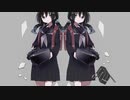
曲: 稲葉曇『ひみつの小学生』Vo. 歌愛ユキ[1]
参考にしたUST: 【黯冥ダスト】ひみつの小学生【UTAUカバー+ust配布】(現在非公開)
使用歌声データベース: 御丹宮くるみ歌声データベース[2]
イラスト: 御丹宮くるみ
1. https://www.nicovideo.jp/watch/sm36042320
2. http://onikuru.info/db-download
歌声はコンプ, EQ, リバーブ, ディレイをかけていますが, タイミングやピッチ補正はしておらず NNSVS の出力のままです.
NNSVS settings:
timelag model: FeedForwardNet num_layers: 2 hidden_dim: 128
duration model: RMDN num_gaussians: 4 num_layers: 2 hidden_dim: 256
acoustic model: RMDN with mlpg num_gaussians: 4 num_layers: 2 hidden_dim: 256
disabled gain_normalize
【PC】 Rainbow Six Siege Highlights #14

r6s Settings
DPI xy1200
X&Y : 4:6
AIM 50
Aspect Ratio 16:10
120Hz
FOV 90
【Rocket League】カメラ設定解説【初心者向け】

どうも、こんにちはベルです。
無料化が来たため、初心者に向けての動画を作りました。その第一弾です。
鳥のせせり刺し食ったらあたりました。
二日ほど、飲まず食わずで地獄を見ました・・・。
ベルのカメラ設定
視野:110
距離:270
高度:110
アングル:-4.0
追随:0.5
回転速度:8.00
変更速度:1.70
プロのカメラ設定一覧
https://liquipedia.net/rocketleague/List_of_player_camera_settings
フィリピンの分譲住宅

フィリピンの Ayala グループ AVIDA が カビテに販売している分譲住宅 Avida Settings Cavite です。youtubeは http://www.youtube.com/watch?v=XDf3omiiq40
【洋楽再エンコテスト】Camila Cabello ft. Young Thug - Havana

Camila Cabello ft. Young Thug - Havana
Fifth Harmony関連mylist/60052409
2018年リリース予定のデビュー・スタジオ・アルバム「Camila」の プロモーション・シングル
ラッパーのYoung Thugをゲストボーカルとしてフィーチャー
vevoって日本と海外でFormat settings, RefFrames全て変えてる?
UK Singlesで2位を獲得
9Mbpsにしたのでニコニコ側の再エンコでどう生成されるかの実験
Video: MPEG4 Video (H264) 1920x1080 23.976fps 9099kbps
Audio: AAC 44100Hz stereo 246kbps
【MMDアークナイツ】濁心スカジ『Gimme×Gimme』

References
Character:
濁心斯卡蒂 https://www.aplaybox.com/details/model/AXYFoTsHWhmv
綠式Skadi Face expression https://www.bilibili.com/blackboard/activity-mrfzrlha.html
Physical effect settings by SirWU
https://3d.nicovideo.jp/works/td92636
Motion & Camera:
モーション by シガー さん
リップ表情 by ノン さん
カメラ by 鷹羽はるひ さん
Singer:
Gimme×Gimme/月乃×藍月なくる【歌ってみた】
https://www.youtube.com/watch?v=Lsbb2JOU8Hg
Stage:
おおい さん
Effect:
そぼろ/針金P/Ray-MMD/ZaziTheAngel19 さん
※Do not reprint without permission.
※未經許可請勿轉載。
Youtube 4K : https://www.youtube.com/watch?v=qhhXlsKTURM
青/164【covered by lev】
初めましてlevです。【歌コレ初参加】
164様の青を感傷的に歌わせていただきました。
original
青/164 feat.MAYU
https://youtu.be/3CIVK0XuuFE
https://nico.ms/sm19473241
(music and words 164様)
素敵な作品お借り致しました。
cover vo.lev (https://twitter.com/lev_lilac
mix.カタムチ様 (https://twitter.com/pile_kuwa
(sing key settings+3)
グラボを実質的に安く買いたいマイニング解説【VOICEROID解説】
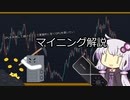
動画作成中にマイニングが衰退したので初投稿です
動画目次 #1:39 マイニング概要 #2:24 マイニングできるGPU #5:10 新品で買うおすすめGPU #7:49 マイニング実践編 #14:33 現金化の方法 #18:28 独り言とアルトコインマイニング
URLなどリンク集
マイニング電卓
https://minerstat.com/hardware/gpus?lang=ja
minerstat
https://minerstat.com/
minerstatダッシュボード
https://my.minerstat.com/
2MinersのETHプールアドレス
asia-eth.2miners.com:2020
BINANCE
https://accounts.binance.com/ja/register?ref=Y9D99IAF
招待ID Y9D99IAF
BINANCEのNANOウォレット
https://www.binance.com/ja/my/wallet/account/main/deposit/crypto/XNO
NATRIUMのNANOウォレット
https://natrium.io/
afterburner
https://jp.msi.com/Landing/afterburner/graphics-cards
NiceHashブログ オーバークロック設定
https://www.nicehash.com/blog/post/nvidia-and-amd-graphics-card-oc-settings-for-mining
GMOコイン
https://coin.z.com/jp/
Gate.io
https://www.gate.io/ref/7162541
招待ID 7162541
私のXLMアドレス ネットワークはXLM(Stellar Lumens)
GAHK7EEG2WWHVKDNT4CEQFZGKF2LGDSW2IVM4S5DP42RBW3K6BTODB4A
MEMO
190013202
BINANCE Pay
私のPayID 270678021