
キーワード tutorials が含まれる動画 : 524 件中 97 - 128 件目
種類:
- タグ
- キーワード
対象:
FLACをMP3に変換する手順

http://www.fonepaw.jp/tutorials/convert-flac-to-mp3.html
高速かつ無劣化でFLACをMP3に複数変換したいなら、「FonePaw スーパーメディア変換」がお手助けになります。今回は「FonePaw スーパーメディア変換」でFLACをMP3に変換する手順を紹介します。
MOVをAVIに変換する方法

http://www.fonepaw.jp/tutorials/convert-mov-to-avi.html
「FonePaw スーパーメディア変換」はMOVをAVIに高速変換できるプロなソフト。変換技術なんか一切必要なし。動画品質向上のために動画・音声パラメータを変更することまで可能です。
FLVをWMVに変換できる簡単な手順
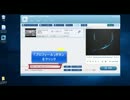
http://www.fonepaw.jp/tutorials/convert-flv-to-wmv.html
オンライン動画でよく使われているFLVを再生や編集するのに、認識されず大変です。FLVの、特にPCでの再生や編集問題を解決するために、FLVをPCで圧倒的な人気を誇るWMV形式に変換します。この文章はその変換方法を詳しく紹介するものです。
AndroidからiPhoneへ写真・画像を移行する方法

https://www.fonepaw.jp/tutorials/transfer-photos-from-android-to-iphone.html
AndroidからiPhoneへ写真や画像を移行したい時は、専用の移行ソフト「FonePaw スマホ データ移行」をおすすめします。「FonePaw スマホ データ移行」で写真をiPhoneに移行するには、iTunesなどを使わず、USBケーブルのみで画像を一括移行できます。

ゴエティア 変異クィーンスパイダー戦

何の変哲もない普通のボスでしたー
強いて言えば「子蜘蛛クリックしにくいかも」「HPバー デカっ!!」くらいかな(´・ω・`)
ところで…
この動画では録画に先日リリースされた「スーパーアマレココ」を使っています(試し撮り)
スーパーアマレココは旧アマレココをWindows10に最適化したもので10専用のソフトです
特徴としては録画の負荷がとても軽くプレイにほとんど影響を与えません
難点は専用のコーデックが必要なこととロゴが入ってしまうことでしょうか
個人的には使い慣れているOBSの方が好みですがプレイ録画に興味のある方はぜひ
http://www.amarectv.com/download_amarecco4.htm
あと有料ソフト「Aiseesoft スクリーンレコーダー」が11月30日迄無料です><
http://www.aiseesoft.jp/tutorials/record-audio-from-youtube/
Childhood - Emocity feat.初音ミク【オリジナル】

どうも。2発目です。
Music&Lyrics:MaKoTo(from Emocity)
Mix&Mastering:MaKoTo(from Emocity)
illustration:じゅね(Pixiv ID 14722746)
http://www.psdstack.com/photoshop-tutorials/photo-manipulation/create-starry-sky-photo-manipulation-photoshop/
twitter:@makoto_lth
Contact:[email protected]
Best graphics Drawing Tablet XP-PEN Star06 for beginners

https://www.amazon.com.au/XP-Pen-Wireless-Graphics-Drawing-Painting/dp/B072TZ1WQ2 One of the biggest names in drawing tablets, XP-PEN is always sure to provide an excellent user experience with any of its tablet products. The XP-PEN Star06 Draw is the perfect option if you are looking for a quality artist’s tablet designed for beginners. It’s the best drawing tablet for artists in terms of price and value for money. This tablet is compatible with all major operating systems, and can be used with programs such as Adobe Photoshop with ease. The XP-PEN Star06 ships with a free drawing pack, which includes tutorials as well as the ArtRage drawing software. The drawing pen that comes shipped with the tablet is battery-free, which is a great feature for those looking for a low maintenance device.



【ゆっくり実況】[#4]適当にマインクラフト @The Iron Titanがぶっ壊れました
![【ゆっくり実況】[#4]適当にマインクラフト @The Iron Titanがぶっ壊れました](https://nicovideo.cdn.nimg.jp/thumbnails/34847007/34847007.3550)
ちゃっす!きわむです。
今回はThe Iron Titanを作りました。材料を集めるところから考えると9時間くらいかかりました。でも、9時間でこれができると思うと、簡単な方なのかな?
■参考動画
https://www.youtube.com/watch?v=AoM0qxVVfak&t=1617s
■村について
https://minecraft-ja.gamepedia.com/村
https://www26.atwiki.jp/minecraft/pages/563.html#id_912005be
https://minecraft.gamepedia.com/Tutorials/Village_chaining
https://minecraft.gamepedia.com/Tutorials/Iron_golem_farming
●使用機材
キャプチャーボード:https://amzn.to/2yw9Emg
●使用音源(フリー音源)
魔王魂 http://maoudamashii.jokersounds.com/
効果音ラボ http://soundeffect-lab.info/
MusMus http://musmus.main.jp/
ニコニ・コモンズ https://commons.nicovideo.jp/
くらげ工匠 http://www.kurage-kosho.info/others.html
甘茶の音楽工房 http://amachamusic.chagasi.com/
NCS https://www.youtube.com/user/NoCopyri...
※ゆっくりキャラ素材は利用規約を遵守して使用しています。
Twitterのアカウント
https://twitter.com/kiwamu_YT
(動画作成に関することや、まったく関係ないことまで呟いてます。)
【Minecraft】この素晴らしい世界に修復を! part26

Minecraft1.13の世界をプレイしていきます。
昆布美味しいよね。
この前、出汁がら昆布を佃煮にして食べました。
少ししょっぱかったけど美味しくできました。
前:sm35025540 次:sm35104126 不定期更新ですな
このシリーズのマイリス:mylist/63812894
その他のMinecraft:mylist/31656438
※参考
Tutorials/Turtle farming
https://minecraft.gamepedia.com/Tutorials/Turtle_farming
昆布が水流の中でも成長して水流を水源化する問題
https://bugs.mojang.com/browse/MC-133354
River Biome Trident Farm
https://youtu.be/5ZCBqjvMtNs
茜ちゃんをLive2Dで動かしてみるテスト

Live2DのステマLive2Dを触ってみたので茜ちゃんをちょこっと動かすだけの動画
Live2Dチュートリアル
https://docs.live2d.com/cubism-editor-tutorials/top/
Live2D Drawer(AviutilでLive2D動かすプラグイン)
https://www.nicovideo.jp/watch/sm31383040

【FTD】MODの自由作戦_10自作シンプルウェポン作成(モデルの挙動)
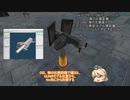
紙芝居になってしまう。
まだまだ続くよSW解説...
SWModの構築概要は、意外と人間の直観に近いっぽい
sm36648010>>mylist/64463039 >> sm36746568 次回、ciwsをつくり始める
公式フォーラムによるSWMODの設定資料
From The Depths - Forum Community Modding How to mod (tutorials and such) Modding the new simple weapons
↑の今回説明したところの日本語訳(機械翻訳)
--> base ブロック自体のメッシュは動かず、砲塔のベースとなる部分
+-->Shield 垂直軸の周りでしか回転しないサブオブジェクト、基本的には砲塔の胴体部分
+--> Gun 仰角俯角の稼働のサブオブジェクト、あと、発砲炎の設定など
+--> Barrel 銃の可動部分だが、ブローバックができる
+--> Gatling 銃の可動部、これは、回転ができる
GUN
D 弾の出現距離 (デフォルト値: 0) .
H 弾の出現する高さ (デフォルト値: 0)
F 発砲炎の出現距離
(大型のものは、発砲炎の距離より遠い地に位置から弾を出現させた方が良い)
S 2 つのバレル間の距離をメートル単位で指定します (デフォルト値: BarrelSpacing)
I 銃を識別できるようにするためのID。この番号に対応する銃身が、
ガトリングやバレルの挙動に紐づけられる。 (デフォルト値: 0)
BARREL
D 反動距離 ( デフォルト値: 関連するGUNの発砲炎距離 (F 変数 ) / 10)
T 反動後に初期位置に戻るまでの時間(デフォルト値:装填時間 / 2)
I バレルを取り付けるガンのID ( デフォルト値: 0)
GATLING
B 銃身の数 ( デフォルト値: 1)
I ガトリングを取り付けるGUNのID( デフォルト値 : 0)
【RimWorld】初心者のためのMOD作成解説動画 -Patch編-【VOICEROID解説】

MOD開発をしていたら遅くなりました。
ぶっちゃけPatchに関しては↓の関連リンクにある英wiki見たほうが早いしわかりやすい。
それと最後に1つご提案がありますので、ぜひ最後までご視聴ください。
・Def編 sm36925212
・Patch編 ここ
・dll編 制作中 (モチベが続きませんでしたごめんなさい)
→うどん先生の動画が参考になります
https://www.nicovideo.jp/series/294846
#01:35 Def上書きの問題点
#03:11 Add(+Patchの基本構造)
#04:40 Insert
#05:24 Replace
#06:30 Remove
#07:28 FindMod
#09:11 Conditional
#10:07 Sequence
#12:13 Test
#13:29 実例
作者twitter: https://twitter.com/hatena_ab
【お役立ちリンク集】
・英改造wiki https://rimworldwiki.com/wiki/Modding_Tutorials/PatchOperations
・特別なxpath https://www.w3schools.com/xml/xml_xpath.asp
・Discordサーバー「RimMod相談所」:https://discord.gg/ARESE5c
・Range Animal Framework(Continued):https://steamcommunity.com/sharedfiles/filedetails/?id=2088183481
・例題MOD2:https://ux.getuploader.com/hatena_ab1/download/11
※情報量が多いため、一時停止推奨です。
【Blender】魔物のモデリング成長記録その1【サイコロ】

簡単とされるサイコロですが、
自分自身は親切丁寧なチュートリアル、いろんな解説動画を何回もやってやっとその通りにできるようになりました・・・
動画は複数回試行錯誤して上手くいったときの作業動画です!
モデリング部分は基本的に倍速はおこなわず、通常速度にしています。
なのでモデリング難しくてできないよ!って方もぜひ挑戦してみてください!
参考動画URL:https://www.youtube.com/watch?v=oOtUtLwy-p8&t=348s
The dice are supposed to be easy.
I've done the kind and careful tutorials myself, and various instructional videos many times, and I'm finally able to follow them...
The video is a working video of multiple attempts at getting it right!
I don't double speed for modeling part, I just use normal speed.
So it's too hard to do the modeling! And if you're saying, "I'm not sure I'll ever be able to do that," try it!

【Blazor, ASP.NET Core】 Let's start Blazor

I referred to Microsoft Docs.
Using ASP.NET Core SignalR with Blazor WebAssembly
https://docs.microsoft.com/ja-jp/aspnet/core/tutorials/signalr-blazor-webassembly?view=aspnetcore-3.1&tabs=visual-studio
Music: Claude Achille Debussy
(Deux Arabesques) wave file
Blog
https://akasatanahama.com/
Twitter
https://twitter.com/fullNam35087976/
Github
https://github.com/shaieaokamodkijiadjfoa/
【日本語解説】Blazorを始めよう【Blazor, ASP.NET Core】
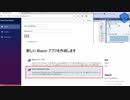
音楽、Music: クロード・アシル・ドビュッシー《Claude Achille Debussy》
2つのアラベスク (Deux Arabesques) 第1番ホ長調 wave file
Microsoft Docsを参考にしました。
ASP.NET Core SignalR を Blazor WebAssembly と共に使用する
https://docs.microsoft.com/en-us/aspnet/core/tutorials/signalr-blazor-webassembly?view=aspnetcore-3.1&tabs=visual-studio
Blog
https://akasatanahama.com/
Twitter
https://twitter.com/fullNam35087976/
Github
https://github.com/shaieaokamodkijiadjfoa/
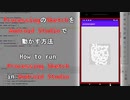
ProcessingのSketchをAndroid Studioで動かす方法
音楽、Music: クロード・アシル・ドビュッシー《Claude Achille Debussy》
ベルガマスク組曲 第1曲 「前奏曲」プレリュード (Suite bergamasque, Prélude) wave file
Latest release of the Android mode
https://github.com/processing/processing-android/releases
Processing for Android
https://android.processing.org/tutorials/android_studio/index.html
ProcessingのSketchをAndroid Studioを使ってエミュレーターや実機で動かす方法を紹介します。
I'll show you how to run Processing Sketch on an emulator or a real machine using Android Studio.
Blog
https://akasatanahama.com/
Twitter
https://twitter.com/fullNam35087976/
Github
https://github.com/shaieaokamodkijiadjfoa/

【ボイロノウハウ祭】動画の技術の集め方

さすがにノウハウっぽいのもちゃんと上げとこうと思って
動画内で紹介したもの
After Effects チュートリアル: https://helpx.adobe.com/jp/after-effects/tutorials.html
VIDEO COPILOT: https://www.videocopilot.net/
Vook: https://vook.vc/
Foundry 2020 | Showreel: https://www.youtube.com/watch?v=eetVbwyLqaQ
Baahubali 2 - The Conclusion | VFX Breakdowns: https://www.youtube.com/watch?v=kmwZWuxeGvM
TRAPCODE SUITE | Introducing Trapcode Suite 16: https://www.youtube.com/watch?v=pt2Kua0uV98
AutoFill Plugin - Available Now: https://www.youtube.com/watch?v=464fYq3rjRo
Flashback: https://flashbackj.com/
aescripts: https://aescripts.com/
t: https://twitter.com/mes_deleted_n
主催の方のボイロノウハウ祭 開催告知動画: sm37906775
とつぜんゲームが作りたくなったので07
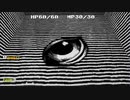
いちばん最初の面できたとこ((0u0))
next sm38123904
Thank you for Great Tutorials!!!(((0u0)))
■BLENDER TUTORIAL
Grant Abbitt
https://www.youtube.com/c/GrantAbbitt/
Blender Guru
https://www.youtube.com/user/AndrewPPrice/
3D Magic Tutorials
https://www.youtube.com/c/3DMagicTutorials/
Imphenzia
https://www.youtube.com/c/Imphenzia/
weeliano
https://www.youtube.com/user/weeliano/
えすふぉるそ
https://www.youtube.com/channel/UCtw9-O1S6nFgf_TTAzp0BLw/
CG Geek
https://www.youtube.com/c/CGGeek/
トハの3DCG暮らし
https://tohawork.com/zeromodelling
■music:こんとどぅふぇ HiLi-ひぃ-
【chou A la creme~恋の魔法はシュークリィム ~ feat.茶太郎】
https://conte-de-fees.com/1428.html
■SE:びたちー素材館
http://www.vita-chi.net/sozai1.htm
とつぜんゲームが作りたくなったので08
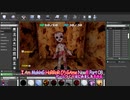
初ヒト型の敵つくりました((0u0))
Thank you for Great Tutorials!!!(((0u0)))
■Pupulu Animation
https://www.youtube.com/c/PupuluAnimation/
■トハの3DCG暮らし
https://tohawork.com/zeromodelling
■SE:びたちー素材館
http://www.vita-chi.net/sozai1.htm
■Music:ONTAMA
http://ontama-m.com/
【Sims3】ダックツアー【建築紹介】

水陸両用車DUKWをベースにした観光バスと、海上に張り出した小さな家を作りました。家は店舗兼住宅として使うことを想定した作りになっています。トイレ不足解消のための離れも併置しました。
区画:40x40
家具なし値段:§ 196,762
家具付き値段:§2,065,633
CC:不使用
チート:moveobjects, buydebug, constrainfloorelevation
斜面に段々住宅を建てるやり方は、以下のサイトを参考にさせていただきました。
・ブログ「Simension」内の記事「Tutorial: hillside lots – building the house into the slope」(http://simension.de/sims-3-english-tutorials/sims-3-tutorial-hillside-plots-building-entrys-on-top-and-bottom-level/)
Sims3建築シリーズ→series/121427

D5 Render Trailer

Created by Dejie Yu
The All-New D5 Render is a real-time raytracing render, built on top of D5’s proprietary dynamic global illumination system and NVIDIA’s RTX & DLSS acceleration Technology.
Compatible with SketchUp | Revit | Rhino | ArchiCAD | 3DS Max | Blender to find out more about your workflow, click https://www.d5render.com/workflow
Professional Material and 3D Object Library for Interior, Architecture, and Landscape Design.
D5 Render Community Version is Free to render images up to 8K resolution.
Download it at https://www.d5render.com/
To join our community for more useful tips and tutorials, https://www.facebook.com/groups/D5RenderCommunity
